Excel HLOOKUP Function
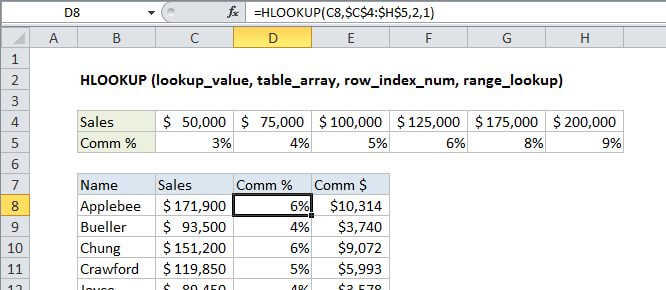
Summary
HLOOKUP is an Excel function to lookup and retrieve data from a specific row in table. The "H" in HLOOKUP stands for "horizontal", where lookup values appear in the first row of the table, moving horizontally to the right. HLOOKUP supports approximate and exact matching, and wildcards (* ?) for finding partial matches.
Purpose
Look up a value in a table by matching on the first row
Return value
The matched value from a table.
Syntax
=HLOOKUP (value, table, row_index, [range_lookup])
Arguments
- value - The value to look up.
- table - The table from which to retrieve data.
- row_index - The row number from which to retrieve data.
- range_lookup - [optional] A boolean to indicate exact match or approximate match. Default = TRUE = approximate match.
Usage notes
HLOOKUP searches for a value in the first row of a table. At the match column, it retrieves a value from the specified row. Use HLOOKUP when lookup values are located in the first row of a table. Use VLOOKUP when lookup values are located in the first column of a table.
- Range_lookup controls whether value needs to match exactly or not. The default is TRUE = allow non-exact match.
- Set range_lookup to FALSE to require an exact match.
- If range_lookup is TRUE (the default setting), a non-exact match will cause the HLOOKUP function to match the nearest value in the table that is still less than value.
- When range_lookup is omitted, the HLOOKUP function will allow a non-exact match, but it will use an exact match if one exists.
- If range_lookup is TRUE (the default setting) make sure that lookup values in the first row of the table are sorted in ascending order. Otherwise, HLOOKUP may return an incorrect or unexpected value.
- If range_lookup is FALSE (require exact match), values in the first row of table do not need to be sorted.