Excel LOOKUP Function
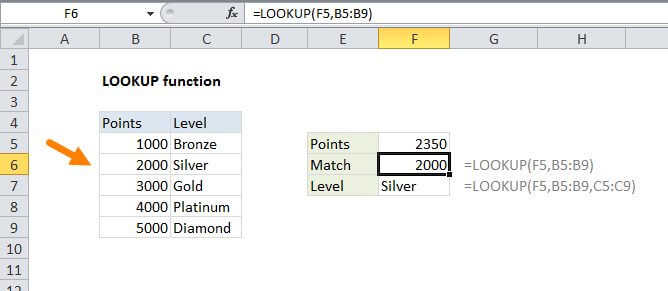
Summary
The Excel LOOKUP function performs an approximate match lookup in a one-column or one-row range, and returns the corresponding value from another one-column or one-row range. LOOKUP's default behavior makes it useful for solving certain problems in Excel.
Purpose
Look up a value in a one-column range
Return value
A value in the result vector.
Syntax
=LOOKUP (lookup_value, lookup_vector, [result_vector])
Arguments
- lookup_value - The value to search for.
- lookup_vector - The one-row, or one-column range to search.
- result_vector - [optional] The one-row, or one-column range of results.
Usage notes
Note: This page describes the vector form of the LOOKUP function. In this case, a vector refers to a one-column or one-row range.
Use the LOOKUP function to look up a value in a one-column or one-row range, and retrieve a value from the same position in another one-column or one-row range. The lookup function has two forms, vector and array. This article describes the vector form.
LOOKUP has default behaviors that make it useful when solving certain problems (i.e. retrieve approximate matched value instead of position, find the value in the last non-empty cell in a row or column, etc.). LOOKUP assumes that values in lookup_vector are sorted in ascending order and always performs an approximate match. When LOOKUP can't find a match, it will match the next smallest value.
- LOOKUP assumes that lookup_vector is sorted in ascending order.
- When lookup-value can't be found, LOOKUP will match the next smallest value.
- When lookup_value is greater than all values in lookup_vector, LOOKUP matches the last value.
- When lookup_value is less than all (i.e. the first) value in lookup_vector, LOOKUP returns #N/A.
- result_vector must be the same size as lookup_vector.
- LOOKUP is not case-sensitive