Excel MMULT Function
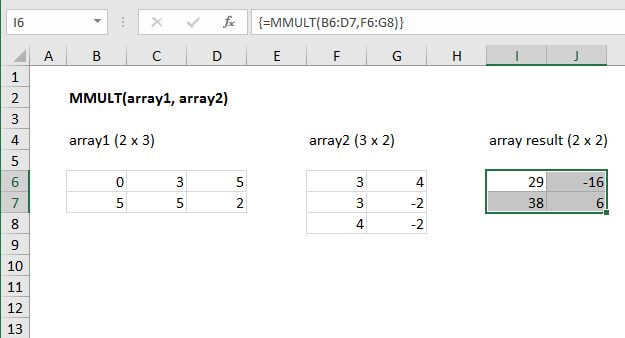
Summary
The Excel MMULT function returns the matrix product of two arrays. The array result contains the same number of rows as array1 and the same number of columns as array2. If returning multiple results in an array on the worksheet, enter as an array formula with control + shift + enter.
Purpose
Perform matrix multiplication
Return value
The matrix product of two arrays
Syntax
=MMULT (array1, array2)
Arguments
- array1 - The first array to multiply.
- array2 - The second array to multiply.
Usage notes
The MMULT function returns the matrix product of two arrays. The column count of array1 must equal the row count of array 2. The array result will contain the same number of rows as array1 and the same number of columns as array2. For example, you can multiply a 4 x 2 array by a 2 x 2 array to return a 4 x 2 array result.
If returning multiple results in an array on the worksheet, enter as an array formula with control + shift + enter.
Notes:
- Arrays must contain only numbers.
- Columns in array1 must equal the rows in array2.
- Array1 and Array2 can be provided as cell ranges, array constants, or references.
- Formulas that return arrays must be entered as array formulas using control + shift + enter.
- MMULT returns the #VALUE! error if any cells in array1 and array2 are not numbers, or if array1 columns do not equal array2 rows.