Excel OFFSET Function
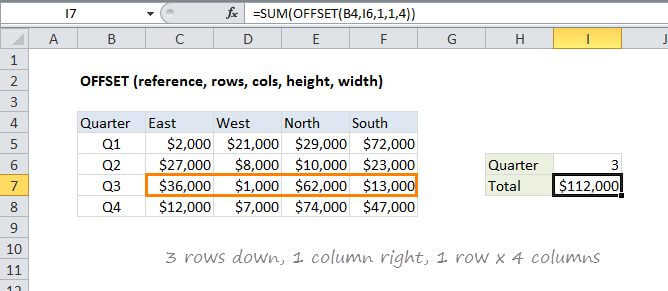
Summary
The Excel OFFSET function returns a reference to a range constructed in parts: a starting point, a row and column offset, and a final height and width in rows and columns. OFFSET is handy in formulas that dynamically average or sum "last n values".
Purpose
Create a reference offset from given starting point
Return value
A cell reference.
Syntax
=OFFSET (reference, rows, cols, [height], [width])
Arguments
- reference - The starting point, supplied as a cell reference or range.
- rows - The number of rows to offset below the starting reference.
- cols - The number of columns to offset to the right of the starting reference.
- height - [optional] The height in rows of the returned reference.
- width - [optional] The width in columns of the returned reference.
Usage notes
OFFSET returns a reference to a range that is offset from a starting point in a worksheet. The starting point can be one cell or a range of cells, and the offset is supplied as rows or columns "offset" from the starting point. The height and width arguments are optional and determine the size of the reference that is created.
OFFSET can be used to build a dynamic named range for charts or pivot tables, to make sure that source data is always up to date.
- OFFSET only returns a reference, no cells are moved.
- Both rows and cols can be supplied as negative numbers to reverse their normal offset direction - negative cols offset to the left, and negative rows offset above.
- OFFSET is a "volatile" formula; it is recalculated whenever there is any change to a worksheet. It can slow down Excel in a complicated worksheet.
- OFFSET will display the #REF! error value if the offset is outside the edge of the worksheet.
- When height or width is omitted, the height and width of reference is used.
- OFFSET can be used with any other function that expects to receive a reference.