Excel CEILING Function
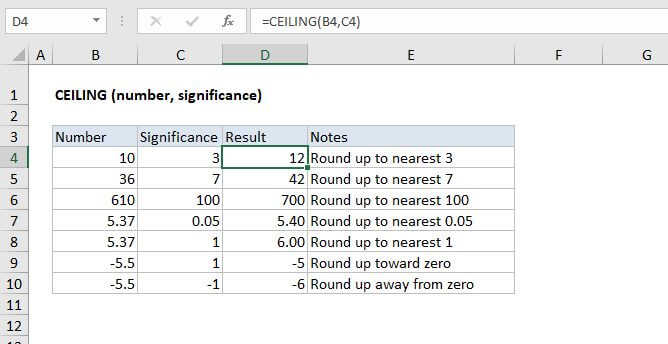
Summary
The Excel CEILING function returns a given number rounded up to a specified multiple. For example, =CEILING(A1,5) could be used to round a price in A1 to the nearest 5 dollars. CEILING always rounds up.
Purpose
Round a number up to nearest multiple
Return value
A rounded number.
Syntax
=CEILING (number, multiple)
Arguments
- number - The number that should be rounded.
- multiple - The multiple to use when rounding.
Usage notes
The Excel CEILING function rounds a number up to a given multiple. For example, the following could be used to round a price in A1 to the nearest 5 dollars.
=CEILING(A1,5)
CEILING can be a can be a useful function to set pricing after currency conversion, discounts, etc. For example, the formula below can round a value in A1 to the nearest 1 dollar, then subtract 1 cent, to get a price like $2.99, $5.99, $49.99, etc.
=CEILING(A1,1) - 0.01
If you need more control over how CEILING rounds negative numbers, see the CEILING.MATH function.
CEILING vs CEILING.MATH
The CEILING.MATH function differs from the CEILING function in these ways:
- CEILING.MATH provides a default multiple of 1 for positive numbers and -1 for negative numbers
- CEILING.MATH provides explicit control for rounding negative numbers (toward zero, away from zero)
- CEILING.MATH appears to use the absolute value of the significance argument. Changing the sign of significance has no effect on the result.
Notes
- CEILING works like the MROUND function, but CEILING always rounds up.
- If number is an exact multiple of significance, no rounding occurs.
- If number and significance are both negative, the value is rounded down, away from zero.
- If number is negative, and significance is positive, the value is rounded up towards zero.