Excel CEILING.PRECISE Function
Summary
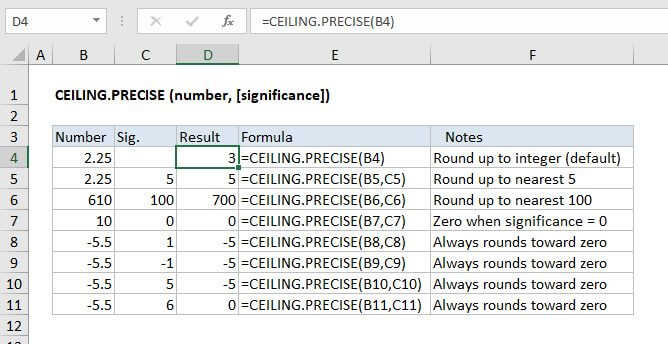
The Excel CEILING.PRECISE function rounds a number up to a given multiple. Unlike the CEILING function, CEILING.MATH defaults to a multiple of 1, and always rounds negative numbers toward zero.
Purpose
Round a number up to nearest multiple
Return value
A rounded number.
Syntax
=CEILING.PRECISE (number, [significance])
Arguments
- number - The number that should be rounded.
- significance - [optional] Multiple to use when rounding. Default is 1.
Usage notes
The Excel CEILING.PRECISE function will round a number up to the nearest integer or given multiple of significance. By default, CEILING.PRECISE rounds to the nearest integer, using a significance of 1. Positive numbers with decimal portions are rounded up away from zero to the next multiple of significance (e.g. 6.3 is rounded to 7) , while negative numbers with decimal portions are rounded toward zero (e.g. -6.3 is rounded to -6).
=CEILING.PRECISE(6.3) // returns 7=CEILING.PRECISE(-6.3) // returns -6
Rounding negative numbers
The CEILING.PRECISE function always rounds negative numbers toward zero, and ignores the sign of significance.
=CEILING.PRECISE(-4.1) // returns -4=CEILING.PRECISE(-4.1,1) // returns -4=CEILING.PRECISE(-4.1,-1) // returns -4
CEILING.PRECISE vs CEILING
Unlike the CEILING function, CEILING.PRECISE defaults to a multiple of 1, and always rounds negative numbers toward zero.
The CEILING.PRECISE function differs from the CEILING function in these ways:
- CEILING.PRECISE defaults to a multiple of 1 (i.e. rounds to nearest integer)
- CEILING.PRECISE always rounds negative numbers toward zero
- CEILING.PRECISE ignores the sign of significance argument (uses the absolute value)
Notes
- CEILING.PRECISE always rounds negative numbers toward zero.
- If number is an exact multiple of significance, no rounding occurs.
- To round to the nearest multiple (either up or down) see the MROUND function.