Excel FLOOR.MATH Function
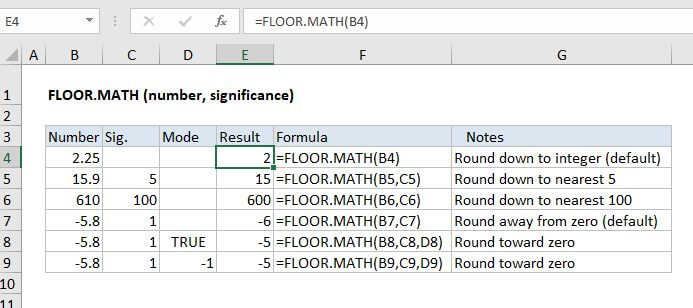
Summary
The Excel FLOOR.MATH function rounds a number down to a specified multiple. Unlike the FLOOR function, FLOOR.MATH defaults to a multiple of 1, and provides explicit support for rounding negative numbers.
Purpose
Round number down to nearest multiple
Return value
A rounded number
Syntax
=FLOOR.MATH (number, [significance], [mode])
Arguments
- number - The number that should be rounded.
- significance - [optional] Multiple to use when rounding. Default is 1.
- mode - [optional] For rounding negative numbers toward or away from zero. Default is 0.
Usage notes
The Excel FLOOR.MATH function will round a number down to the nearest integer or given multiple of significance. By default, FLOOR.MATH rounds to the nearest integer, using a significance of 1. Positive numbers with decimal values are rounded down to the nearest integer (e.g. 6.7 is rounded down to 6) while negative numbers with decimal values are rounded away from zero (e.g. -5.8 is rounded to -6).
=FLOOR.MATH(6.7) // returns 6=FLOOR.MATH(-5.8) // returns -6
Rounding negative numbers
Control for rounding negative numbers toward zero or away from zero is provided with the (optional) mode argument. Mode defaults to zero. When mode is zero, or omitted, FLOOR.MATH rounds negative numbers away from zero. When mode is any non-zero value, FLOOR.MATH rounds negative numbers toward zero. Mode has no effect on positive numbers.
=FLOOR.MATH(-4.1) // returns -5=FLOOR.MATH(-4.1,1) // returns -5=FLOOR.MATH(-4.1,1,1) // returns -4=FLOOR.MATH(-4.1,1,-1) // returns -4=FLOOR.MATH(-4.1,1,TRUE) // returns -4
FLOOR.MATH vs FLOOR
The FLOOR.MATH function differs from the FLOOR function in these ways:
- FLOOR.MATH provides a default significance of 1, rounding to nearest integer
- FLOOR.MATH provides explicit support for rounding negative numbers (toward zero, away from zero)
- FLOOR.MATH appears to use the absolute value of the significance argument. Changing the sign of significance has no effect on the result.
Notes
- To round to the nearest multiple, up or down, see the MROUND function.
- FLOOR.MATH works like FLOOR, but provides control for rounding direction for negative values.
- The mode argument has no effect on positive numbers.
- If number is an exact multiple of significance, no rounding occurs.