Excel FLOOR.PRECISE Function
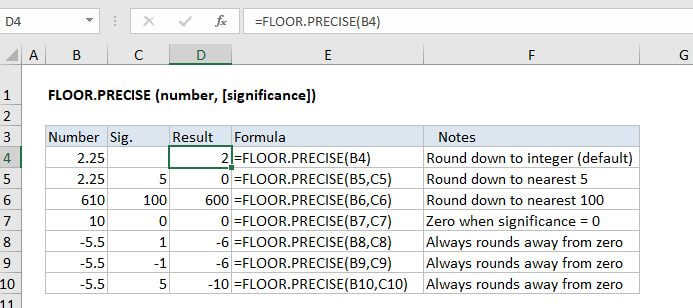
Summary
The Excel FLOOR.PRECISE function rounds a number down to a specified multiple. Unlike the FLOOR function, FLOOR.PRECISE defaults to a multiple of 1, and always rounds negative numbers away from zero.
Purpose
Round number down to nearest multiple
Return value
A rounded number
Syntax
=FLOOR.PRECISE (number, [significance])
Arguments
- number - The number that should be rounded.
- significance - [optional] Multiple to use when rounding. Default is 1.
Usage notes
The Excel FLOOR.PRECISE function will round a number down to the nearest integer or given multiple of significance. By default, FLOOR.PRECISE rounds to the nearest integer, using a significance of 1. Positive numbers with decimal values are rounded down toward zero (e.g. 6.7 is rounded down to 6) while negative numbers with decimal values are rounded away from zero (e.g. -5.8 is rounded to -6).
=FLOOR.PRECISE(6.7) // returns 6=FLOOR.PRECISE(-5.8) // returns -6
Rounding negative numbers
The CEILING.PRECISE function always rounds negative numbers down away from zero, and ignores the sign of significance.
=FLOOR.PRECISE(-4.1) // returns -5=FLOOR.PRECISE(-4.1,1) // returns -5=FLOOR.PRECISE(-4.1,-1) // returns -5
FLOOR.PRECISE vs FLOOR
The FLOOR.PRECISE function differs from the FLOOR function in these ways:
- FLOOR.PRECISE provides a default significance of 1, rounding to nearest integer
- FLOOR.PRECISE always rounds negative numbers down away from zero
- FLOOR.PRECISE ignores the sign of significance (uses the absolute value)
Notes
- FLOOR.PRECISE works like FLOOR, but always rounds negative numbers down away from zero.
- If number is an exact multiple of significance, no rounding occurs.
- To round to the nearest multiple, up or down, see the MROUND function.