Excel MROUND Function
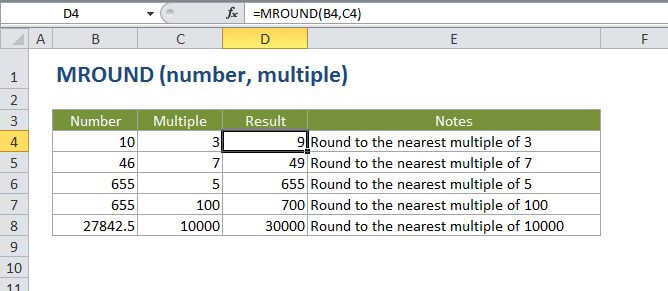
Summary
The Excel MROUND function returns a number rounded to a given multiple. MROUND always rounds up, away from zero.
Purpose
Round a number to the nearest specified multiple
Return value
A rounded number.
Syntax
=MROUND (number, multiple)
Arguments
- number - The number that should be rounded.
- multiple - The multiple to use when rounding.
Usage notes
- MROUND rounds up, away from zero.
- The rounding occurs when the remainder left from piding number by multiple is greater than or equal to half the value of multiple.
- Number and multiple must have the same sign.
Excel MROUND Function

Summary
The Excel MROUND function returns a number rounded to a given multiple. MROUND always rounds up, away from zero.
Purpose
Round a number to the nearest specified multiple
Return value
A rounded number.
Syntax
=MROUND (number, multiple)
Arguments
- number - The number that should be rounded.
- multiple - The multiple to use when rounding.
Usage notes
- MROUND rounds up, away from zero.
- The rounding occurs when the remainder left from piding number by multiple is greater than or equal to half the value of multiple.
- Number and multiple must have the same sign.