Excel DATE Function
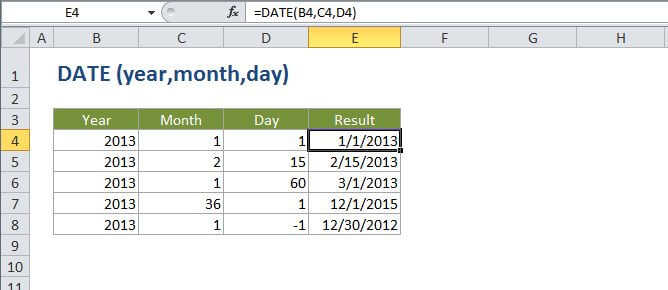
Summary
The Excel DATE function is a built-in function that allows you to create a date with individual year, month, and day components. The DATE function is especially useful when supplying dates as inputs to other functions like SUMIFS or COUNTIFS, since you can easily assemble a date using year, month, and day values that come from a cell reference or formula result.
Purpose
Create a valid date from year, month, and day
Return value
A serial number that represents a particular date in Excel.
Syntax
=DATE (year, month, day)
Arguments
- year - The year to use when creating the date.
- month - The month to use when creating the date.
- day - The day to use when creating the date.
Usage notes
DATE returns a date serial number. Format the result as a date to display as a date.
If year is between zero and 1900, Excel will add 1900 to the year.
Month can be greater than 12 and less than zero. If month is greater than 12, Excel will add month to the first month in the specified year. If month is less than or equal to zero, Excel will subtract the absolute value of month plus 1 (i.e. ABS(month) + 1) from the first month of the specified year.
Day can be positive or negative. If day is greater than the days in the specified month, Excel will add day to the first day of the specified month. If day is less than or equal to zero, Excel will subtract the absolute value of day plus 1 (i.e. ABS(day) + 1) from the first day of the specified month.