Excel ROMAN Function
Summary
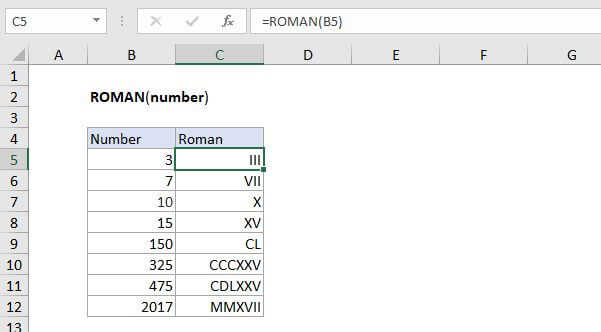
The Excel ROMAN function converts a number to a Roman numeral as text. For example, the formula =ROMAN(4) returns IV.
Purpose
Converts numbers to Roman numerals
Return value
A Roman numeral in text
Syntax
=ROMAN (number, [form])
Arguments
- number - Number (in Arabic numeral) you want to convert to Roman numeral.
- form - [optional] The type of Roman numeral you want.
Usage notes
The ROMAN function converts a number to a Roman numeral. For example,:
=ROMAN(4) // returns "IV"
Roman numbers
The table below lists available Roman numbers with their equivalent Arabic number value.
| Symbol | Value |
|---|---|
| I | 1 |
| V | 5 |
| X | 10 |
| L | 50 |
| C | 100 |
| D | 500 |
| M | 1000 |
Other notes:
- Number must be positive and less than the value 3999.
- The ROMAN function does the opposite of the ARABIC function
- The form argument controls whether the roman numeral is abbreviated or not. The argument is optional and the default is zero (classic non-abbreviated). The ROMAN function supports additional forms 1-4 which are progressively more concise.