Excel ROUNDDOWN Function
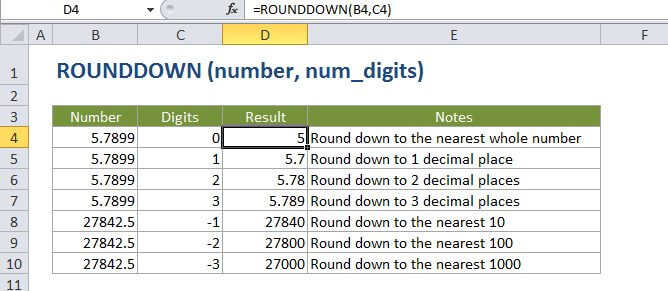
Summary
The Excel ROUNDDOWN function returns a number rounded down to a given number of decimal places. Unlike standard rounding, where only numbers less than 5 are rounded down, ROUNDDOWN rounds all numbers 1-9 up.
Purpose
Round a number down to a given number of digits
Return value
A rounded number.
Syntax
=ROUNDDOWN (number, num_digits)
Arguments
- number - The number to round down.
- num_digits - The number of digits to which number should be rounded down.
Usage notes
The ROUNDDOWN function works like the ROUND function except when rounding, the ROUNDDOWN function will always round the numbers 1-9 down.
The ROUNDDOWN function can round either to the left or right of the decimal point.
If num_digits > 0, number is rounded down to the specified number of decimal places to the right of the decimal point.
If num_digits <>number is rounded down to the left of the decimal point (i.e. to the nearest 10, 100, 1000, etc.).
If num_digits = 0, number is rounded down to the nearest integer.