Excel ROUNDUP Function
Summary
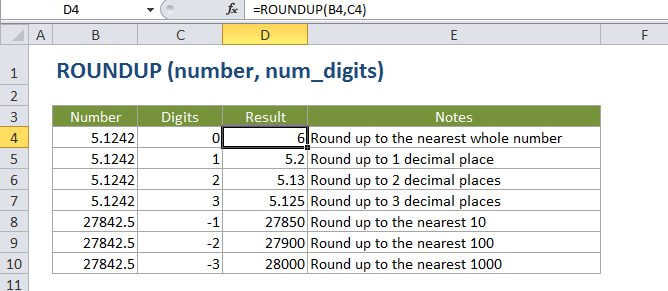
The Excel ROUNDUP function returns a number rounded up to a given number of decimal places. Unlike standard rounding, where numbers less than 5 are rounded down, ROUNDUP always rounds numbers 1-9 up.
Purpose
Round a number up to a given number of digits
Return value
A rounded number.
Syntax
=ROUNDUP (number, num_digits)
Arguments
- number - The number to round up.
- num_digits - The number of digits to which number should be rounded up.
Usage notes
The ROUNDUP function works like the ROUND function except that when rounding, the ROUNDUP function will always round the numbers 1-9 up.
ROUNDUP can round either to the left or right of the decimal point.
If num_digits > 0, number is rounded up to the specified number of decimal places to the right of the decimal point.
If num_digits < 0, number is rounded up to the left of the decimal point (i.e. to the nearest 10, 100, 1000, etc.).
If num_digits = 0, number is rounded up to the nearest integer.