Excel DATEDIF Function
Summary
The Excel DATEDIF function returns the difference between two date values in years, months, or days. The DATEDIF (Date + Dif) function is a "compatibility" function that comes from Lotus 1-2-3. For reasons unknown, it is only documented in Excel 2000, but you can use it in your formulas in all Excel versions since that time.
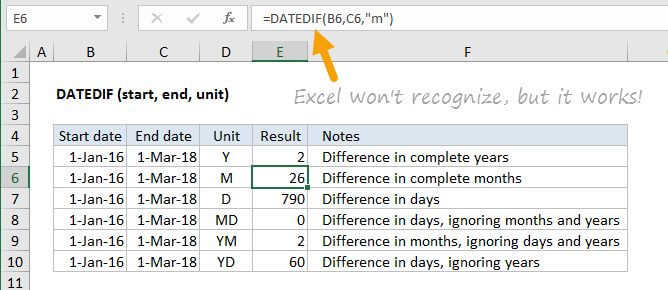
Note: Excel won't help you fill out the arguments for DATEDIF like other functions, but it will work when configured correctly.
Purpose
Get days, months, or years between two dates
Return value
A number representing time between two dates
Syntax
=DATEDIF (start_date, end_date, unit)
Arguments
- start_date - Start date in Excel date serial number format.
- end_date - End date in Excel date serial number format.
- unit - The time unit to use (years, months, or days).
Usage notes
The DATEDIF (Date + Dif) function is a "compatibility" function that comes from Lotus 1-2-3. For reasons unknown, it is only documented in Excel 2000, but it works in all Excel versions since that time. As Chip Pearson says: DATEDIF is treated as the drunk cousin of the Formula family. Excel knows it lives a happy and useful life, but will not speak of it in polite conversation.
The DATEDIF function calculates the time between a start_date and an end_date in years, months, or days. The time unit to return is specified using the unit argument. Unit is supplied as text (upper or lower case), using any one of these values:
| Unit | Return value |
|---|---|
| "Y" | Difference in complete years |
| "M" | Difference in complete months |
| "D" | Difference in days |
| "MD" | Difference in days, ignoring months and years |
| "YM" | Difference in months, ignoring days and years |
| "YD" | Difference in days, ignoring years |
Note: DATEDIF with throw a #NUM error if start date is greater than the end date. If you are working with a more complex formula where start dates and end dates may be unknown, or out of bounds, you can trap the error with the IFERROR function.