Count cells that begin with
Generic formula 

=COUNTIF(rng,"txt*")

Related formulas 

Count cells that end with

Count cells that contain specific text

Explanation

To count the number of cells that begin with certain text, you can use the COUNTIF function. In the generic form of the formula (above) rng is a range of cells, txt represents the text that cells should begin with, and "*" is a wildcard matching any number of characters.

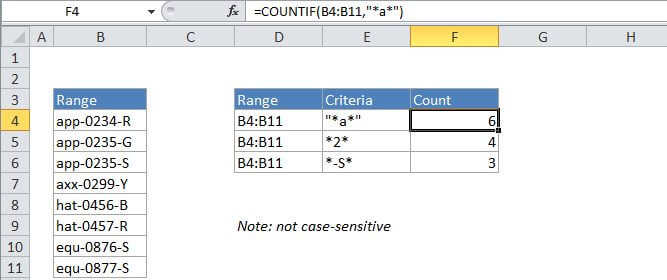
In the example, the active cell contains this formula:

=COUNTIF(B4:B11,"app*")

How this formula works

COUNTIF counts the number of cells in the range that begin with txt by matching the content of each cell against the pattern "txt*", which is supplied as the criteria. The "*" symbol (the asterisk) is a wildcard in Excel that means "match any number of characters". The count of cells that match this pattern is returned as a number.

Count cells that begin with

Generic formula 

=COUNTIF(rng,"txt*")

Related formulas 

Count cells that end with

Count cells that contain specific text

Explanation

To count the number of cells that begin with certain text, you can use the COUNTIF function. In the generic form of the formula (above) rng is a range of cells, txt represents the text that cells should begin with, and "*" is a wildcard matching any number of characters.

In the example, the active cell contains this formula:

=COUNTIF(B4:B11,"app*")

How this formula works

COUNTIF counts the number of cells in the range that begin with txt by matching the content of each cell against the pattern "txt*", which is supplied as the criteria. The "*" symbol (the asterisk) is a wildcard in Excel that means "match any number of characters". The count of cells that match this pattern is returned as a number.