Excel SUBTOTAL Function
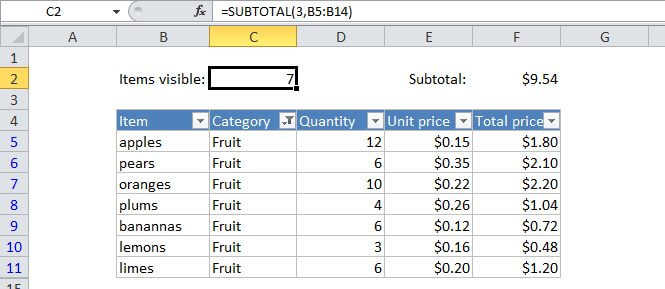
Summary
The Excel SUBTOTAL function returns an aggregate result for supplied values. SUBTOTAL can return a SUM, AVERAGE, COUNT, MAX, and others (see table below), and SUBTOTAL function can either include or exclude values in hidden rows.
Purpose
Get a subtotal in a list or database
Return value
A number representing a specific kind of subtotal
Syntax
=SUBTOTAL (function_num, ref1, [ref2], ...)
Arguments
- function_num - A number that specifies which function to use in calculating subtotals within a list. See table below for full list.
- ref1 - A named range or reference to subtotal.
- ref2 - [optional] A named range or reference to subtotal.
Usage notes
Use the SUBTOTAL function to get a subtotal in a list or database. SUBTOTAL has the ability to use a variety of functions when subtotaling, including AVERAGE, COUNT, MAX, and others (see table below for a complete list). In addition, the SUBTOTAL function can either include or exclude values in rows that are not visible.
Notice that the SUBTOTAL function has "paired" settings (i.e. 1/101, 3/103, 9/109, etc.) to change behavior for hidden cells. When function_num is between 1-11, SUBTOTAL includes cells that are hidden. When function_num is between 101-111, SUBTOTAL excludes values that are hidden.
SUBTOTAL always ignores all cells that are hidden by filtering with Autofilter, so all cells that are "filtered out" will not be included in calculations, regardless of the function_num that is used.
To create a list with subtotals, you might want to use the Subtotal command in the Outline group on the Data tab in the ribbon. You can then modify the SUBTOTAL function if needed.
Available values for function_num:
| Function | Include hidden | Ignore hidden |
| AVERAGE | 1 | 101 |
| COUNT | 2 | 102 |
| COUNTA | 3 | 103 |
| MAX | 4 | 104 |
| MIN | 5 | 105 |
| PRODUCT | 6 | 106 |
| STDEV | 7 | 107 |
| STDEVP | 8 | 108 |
| SUM | 9 | 109 |
| VAR | 10 | 110 |
| VARP | 11 | 111 |
Notes:
- When function_num is between 1-11, SUBTOTAL includes values that are hidden
- When function_num is between 101-111, SUBTOTAL excludes values that are hidden
- In filtered lists, SUBTOTAL always ignores values in hidden rows, regardless of function_num.
- SUBTOTAL ignores other subtotals that exist in references are ignored to prevent double-counting
- SUBTOTAL is designed to work with vertical data values arranged vertically. In Horizontal ranges, values in hidden columns are always included.