Excel SUMIF Function
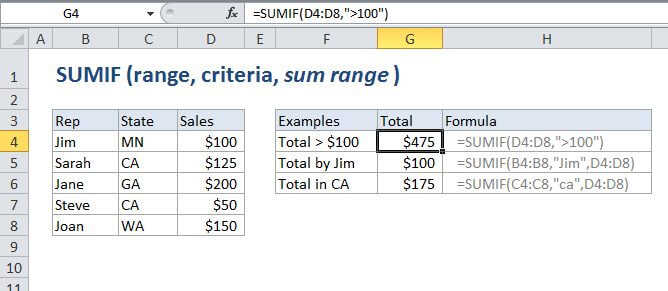
Summary
SUMIF is a function to sum cells that meet a single criteria. SUMIF can be used to sum cells based on dates, numbers, and text that match specific criteria. SUMIF supports logical operators (>,<><>,=) and wildcards (*,?) for partial matching.
Purpose
Sum numbers in a range that meet supplied criteria
Return value
The sum of values supplied.
Syntax
=SUMIF (range, criteria, [sum_range])
Arguments
- range - The range of cells that you want to apply the criteria against.
- criteria - The criteria used to determine which cells to add.
- sum_range - [optional] The cells to add together. If sum_range is omitted, the cells in range are added together instead.
Usage notes
- When sum_range is omitted, the cells in range will be summed.
- Text criteria, or criteria that includes math symbols, must be enclosed in double quotation marks (").
- Numeric criteria can be supplied without quotation marks.
- The wildcard characters ? and * can be used in criteria. A question mark matches any one character and an asterisk matches any sequence of characters.
- To find a literal question mark or asterisk, use a tilde (~) in front question mark or asterisk (i.e. ~?, ~*).
Excel SUMIF Function

Summary
SUMIF is a function to sum cells that meet a single criteria. SUMIF can be used to sum cells based on dates, numbers, and text that match specific criteria. SUMIF supports logical operators (>,<><>,=) and wildcards (*,?) for partial matching.
Purpose
Sum numbers in a range that meet supplied criteria
Return value
The sum of values supplied.
Syntax
=SUMIF (range, criteria, [sum_range])
Arguments
- range - The range of cells that you want to apply the criteria against.
- criteria - The criteria used to determine which cells to add.
- sum_range - [optional] The cells to add together. If sum_range is omitted, the cells in range are added together instead.
Usage notes
- When sum_range is omitted, the cells in range will be summed.
- Text criteria, or criteria that includes math symbols, must be enclosed in double quotation marks (").
- Numeric criteria can be supplied without quotation marks.
- The wildcard characters ? and * can be used in criteria. A question mark matches any one character and an asterisk matches any sequence of characters.
- To find a literal question mark or asterisk, use a tilde (~) in front question mark or asterisk (i.e. ~?, ~*).