Get first text value in a list
Generic formula 

=VLOOKUP("*",range,1,FALSE)

Related formulas 

Get first non-blank value in a list

Two-way lookup with VLOOKUP

Calculate grades with VLOOKUP

Get employee information with VLOOKUP

Merge tables with VLOOKUP

VLOOKUP without #N/A error

Get nth match with INDEX / MATCH

Explanation

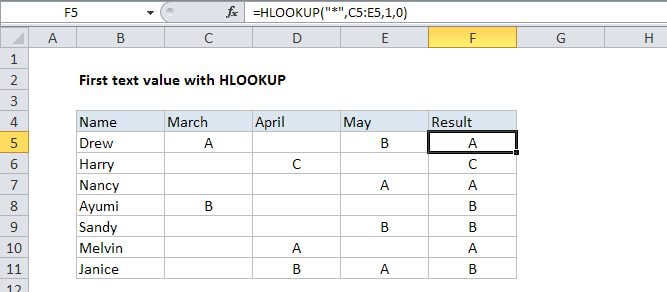
If you need to get the first text value in a list (a one-column range) you can use the VLOOKUP function set to exact match, with a wildcard character for the lookup value.

In the example the formula in D7 is:

=VLOOKUP("*",B5:B11,1,FALSE)

How this formula works

The asterisk (*) wildcard character matches any text value. When used with VLOOKUP in exact match mode (the 4th argument, range_lookup, set to FALSE), the asterisk will match the first cell that contains text. Since we are supplying the column as 1, we get the value from the same range we are using for the table.

Note: this only works for text values, not numbers.

Get first text value in a list

Generic formula 

=VLOOKUP("*",range,1,FALSE)

Related formulas 

Get first non-blank value in a list

Two-way lookup with VLOOKUP

Calculate grades with VLOOKUP

Get employee information with VLOOKUP

Merge tables with VLOOKUP

VLOOKUP without #N/A error

Get nth match with INDEX / MATCH

Explanation

If you need to get the first text value in a list (a one-column range) you can use the VLOOKUP function set to exact match, with a wildcard character for the lookup value.

In the example the formula in D7 is:

=VLOOKUP("*",B5:B11,1,FALSE)

How this formula works

The asterisk (*) wildcard character matches any text value. When used with VLOOKUP in exact match mode (the 4th argument, range_lookup, set to FALSE), the asterisk will match the first cell that contains text. Since we are supplying the column as 1, we get the value from the same range we are using for the table.

Note: this only works for text values, not numbers.