Excel SUMIFS Function
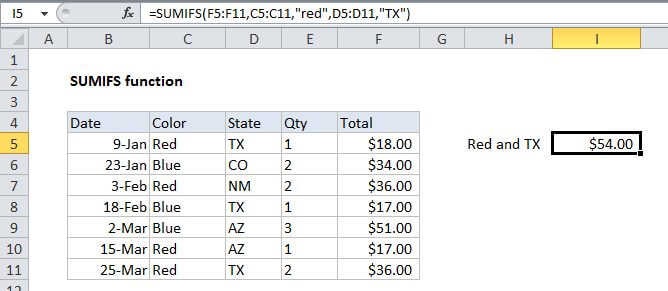
Summary
SUMIFS is a function to sum cells that meet multiple criteria. SUMIFS can be used to sum values when adjacent cells meet criteria based on dates, numbers, and text. SUMIFS supports logical operators (>,<><>,=) and wildcards (*,?) for partial matching.
Purpose
Sum cells that match multiple criteria
Return value
The sum of the cells that meet all criteria
Syntax
=SUMIFS (sum_range, range1, criteria1, [range2], [criteria2], ...)
Arguments
- sum_range - The range to be summed.
- range1 - The first range to evaulate.
- criteria1 - The criteria to use on range1.
- range2 - [optional] The second range to evaluate.
- criteria2 - [optional] The criteria to use on range2.
Usage notes
SUMIFS sums cells in a range that match supplied criteria. Unlike the SUMIF function, SUMIFS can apply more than one set of criteria, with more than one range. The first range is the range to be summed. The criteria is supplied in pairs (range/criteria) and only the first pair is required. For each additional criteria, supply an additional range/criteria pair. Up to 127 range/criteria pairs are allowed. Notes:
- Each additional range must have the same number of rows and columns as the sum_range.
- Non-numeric criteria must be enclosed in double quotes, but numeric criteria does not need quotes except with operators, i.e. ">32"
- The wildcard characters ? and * can be used in criteria. A question mark matches any one character and an asterisk matches any sequence of characters.
- To find a literal question mark or asterisk, use a tilde (~) in front question mark or asterisk (i.e. ~?, ~*).
- SUMIF and SUMIFS can handle ranges, but not arrays. This means you can't use other functions like YEAR on the criteria range, since the result is an array. If you need this functionality, use the SUMPRODUCT function.
- The order of arguments is different between the SUMIFS and SUMIF functions. Sum_range is the first argument in SUMIFS, but the third argument in SUMIF.