Excel AVEDEV Function
Summary
The Excel AVEDEV function returns the average of the absolute value of deviations from the mean for a given set of data. Average deviation is a measure of variability.
Purpose
Get sum of squared deviations
Return value
Calculated sum
Syntax
=AVEDEV (number1, [number2], ...)
Arguments
- number1 - First value or reference.
- number2 - [optional] Second value or reference.
Usage notes
The Excel AVEDEV function calculates the average of absolute deviations from the mean in a given set of data.
Variance and standard deviation functions deal with negative deviations by squaring deviations before they are averaged. AVEDEV handles negative values by working only with absolute values.
This average is called the average absolute deviation. It's an easy way to show variability in a data set, but not as common as variance and standard deviation. One advantage of AVEDEV is that units remain unchanged. If values are centimeters, the absolute average deviation is in centimeters as well.
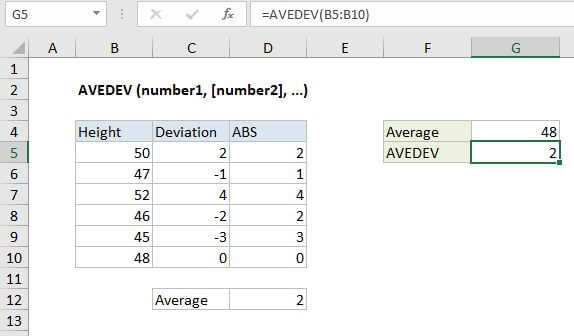
In the example shown, the formula in G5 is:
=AVEDEV(B5:B10)
The formulas in C5 and D5 are, respectively:
=B5-$G$4 // deviation=ABS(C5) // absolute deviation
The value in D12 (2) us simply the average of D5:D10, and agrees with the value returned by AVEDEV in G5.
Notes
- Arguments can be numbers, names, arrays, or references that contain numbers.
- Empty cells, and cells that contain text or logical values are ignored.