Excel AVERAGEA Function
Summary
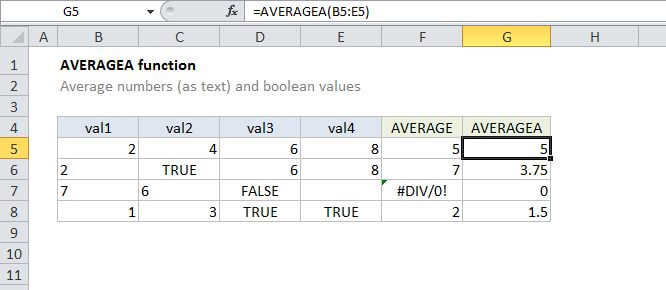
The Excel AVERAGEA function returns the average of a group of supplied values. Unlike AVERAGE, AVERAGEA will also evaluate the logical values TRUE and FALSE, and numbers represented as text, whereas AVERAGE just skips these values during calculation
Purpose
Get the average of a group of numbers and text
Return value
A number representing the average.
Syntax
=AVERAGEA (value1, [value2], ...)
Arguments
- value1 - A value or reference to a value that can be evaluated as a number.
- value2 - [optional] A value or reference to a value that can be evaluated as a number.
Usage notes
The AVERAGEA function returns the average (arithmetic mean) of a group of supplied values. The key difference between AVERAGEA and AVERAGE is AVERAGEA will also evaluate the logical values TRUE and FALSE, and numbers represented as text when when they appear in cell references, whereas AVERAGE just skips these values.
- Values can be supplied as numbers, ranges, named ranges, or cell references that contain values. Up to 255 arguments can be supplied.
- To calculate the average, Excel adds the numeric value of each value together and pides by the total number of values supplied.
- AVERAGEA evaluates TRUE as 1 and FALSE as zero.