Excel AVERAGEIF Function
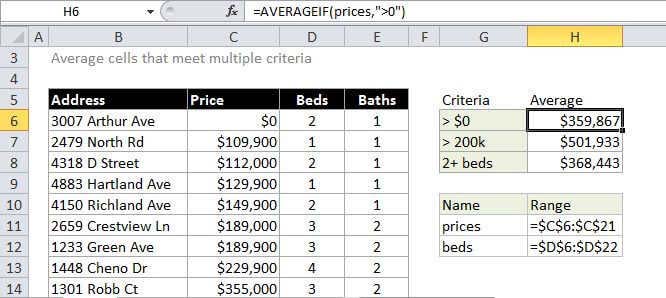
Summary
The Excel AVERAGEIF function computes the average of the numbers in a range that meet the supplied criteria. The criteria for AVERAGEIF supports logical operators (>,<><>,=) and wildcards (*,?) for partial matching.
Purpose
Get the average of numbers that meet criteria
Return value
A number representing the average.
Syntax
=AVERAGEIF (range, criteria, [average_range])
Arguments
- range - One or more cells, including numbers or names, arrays, or references.
- criteria - A number, expression, cell reference, or text.
- average_range - [optional] The cells to average. When omitted, range is used.
Usage notes
AVERAGEIF computes the average of the numbers in a range that meet the supplied criteria. If average_range is not supplied, the cells in range are averaged. If average_range is supplied, cells cells in average_range that correspond to cells in range are averaged.
To determine which cells are averaged, criteria is applied to range. Criteria can be supplied as numbers, strings, or references. For example, valid criteria could be 10, "10" ">10", or A1.
Notes:
- Cells in range that contain TRUE or FALSE are ignored.
- Empty cells are ignored in range and average_range when calculating averages.
- AVERAGEIF returns #DIV/0! if no cells in range meet criteria.
- Average_range does not have to be the same size as range. The top left cell in average_range is used as the starting point, and cells that correspond to cells in range are averaged.
- AVERAGEIF allows the wildcard characters question mark (?) and asterisk (*), in criteria. The ? matches any single character and the * matches any sequence of characters. To find a literal ? or *, use a tilde (~) before the character, i.e. ~* and ~?.