Excel COUNTIF Function
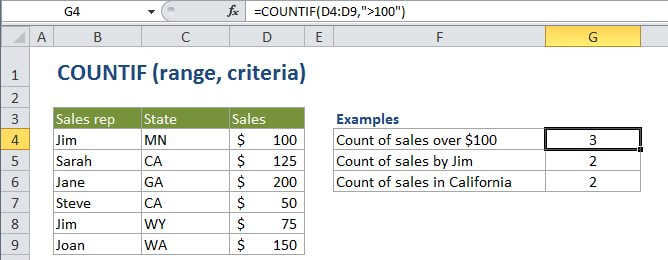
Summary
COUNTIF is a function to count cells that meet a single criteria. COUNTIF can be used to count cells with dates, numbers, and text that match specific criteria. The COUNTIF function supports logical operators (>,<><>,=) and wildcards (*,?) for partial matching.
Purpose
Count cells that match criteria
Return value
A number representing cells counted.
Syntax
=COUNTIF (range, criteria)
Arguments
- range - The range of cells to count.
- criteria - The criteria that controls which cells should be counted.
Usage notes
The COUNTIF function in Excel counts the number of cells in a range that match the supplied criteria
Non-numeric criteria needs to be enclosed in double quotes but numeric criteria does not:
=COUNTIF(A1:A10,100) // count cells equal to 100=COUNTIF(A1:A10,">32") // count cells greater than 32=COUNTIF(A1:A10,"jim") // count cells equal to "jim"=COUNTIF(A1:A10,"<"&B1) // count cells less than value in B1
The wildcard characters ? and * can be used in criteria. A question mark matches any one character and an asterisk matches any sequence of characters.
To find a literal question mark or asterisk, use a tilde (~) in front question mark or asterisk (i.e. ~?, ~*).
See links on this page to more examples with detailed explanations.