Excel COUNTIFS Function
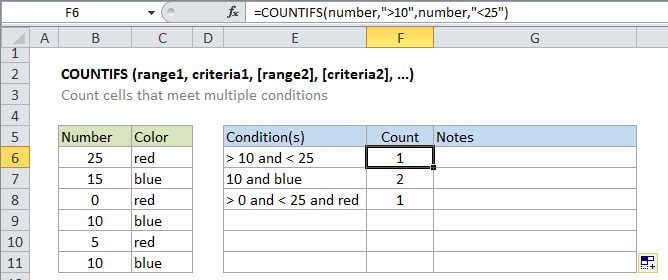
Summary
The Excel COUNTIFS function returns the count of cells that meet one or more criteria. COUNTIFS can be used with criteria based on dates, numbers, text, and other conditions. COUNTIFS supports logical operators (>,<><>,=) and wildcards (*,?) for partial matching.
Purpose
Count cells that match multiple criteria
Return value
The number of times criteria are met
Syntax
=COUNTIFS (range1, criteria1, [range2], [criteria2], ...)
Arguments
- range1 - The first range to evaulate.
- criteria1 - The criteria to use on range1.
- range2 - [optional] The second range to evaluate.
- criteria2 - [optional] The criteria to use on range2.
Usage notes
COUNTIFS counts the number of cells in a range that match supplied criteria. Unlike the COUNTIF function, COUNTIFS can apply more than one set of criteria, with more than one range. Ranges and criteria are applied in pairs, and only the first pair is required. For each additional criteria, you must supply another range/criteria pairs. Up to 127 range/criteria pairs are allowed.
Notes:
- Each additional range must have the same number of rows and columns as range 1, but ranges do not need to be adjacent. If you supply ranges with a mismatch, you'll get a #VALUE errror.
- Non-numeric criteria needs to be enclosed in double quotes but numeric criteria does not. For example: 100, "100", ">32", "jim", or A1 (where A1 contains a number).
- The wildcard characters ? and * can be used in criteria. A question mark matches any one character and an asterisk matches any sequence of characters.
- To find a literal question mark or asterisk, use a tilde (~) in front question mark or asterisk (i.e. ~?, ~*).