Excel DEVSQ Function
Summary
The Excel DEVSQ function returns the sum of the squared deviations from the mean for a given set of data.
Purpose
Get sum of squared deviations
Return value
Calculated sum
Syntax
=DEVSQ (number1, [number2], ...)
Arguments
- number1 - First value or reference.
- number2 - [optional] Second value or reference.
Usage notes
The Excel DEVSQ function calculates the sum of the squared deviations from the mean for a given set of data.
Variance and standard deviation functions deal with negative deviations by squaring deviations before they are averaged. DEVSQ calculates the sum of the squared deviations from the mean, without piding by N or by N-1.
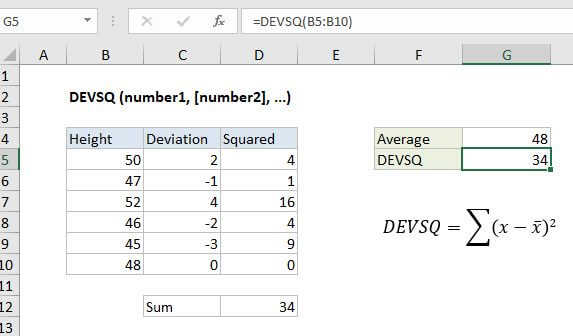
In the example shown, the formula in G5 is:
=DEVSQ(B5:B10)
The formulas in C5 and D5 are, respectively:
=B5-$G$4 // deviation=C5^2 // squared deviation
The value in D12 (34) us simply the sum of D5:D10, and agrees with the value calculated directly by DEVSQ in G5.
Notes
- Arguments can be numbers, names, arrays, or references that contain numbers.
- Empty cells, and cells that contain text or logical values are ignored.