Excel MAXA Function
Summary
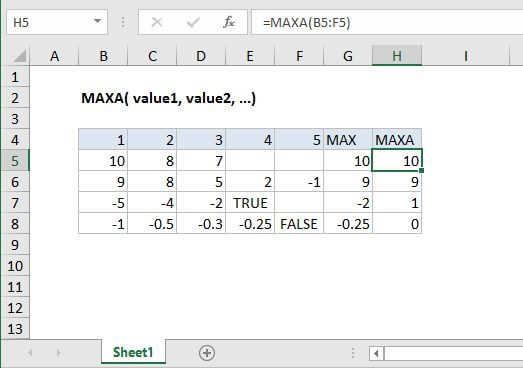
The Excel MAXA function returns the largest numeric value in a range of values. The MAXA function ignores empty cells, but evaluates the logical values TRUE and FALSE as 1 and 0, respectively.
Purpose
Return largest value.
Return value
Largest numeric value
Syntax
=MAXA (value1, [value2], ...)
Arguments
- value1 - Number, reference to numeric value, or range that contains numeric values.
- value2 - [optional] Number, reference to numeric value, or range that contains numeric values.
Usage notes
Like the MAX function, the MAXA function returns the largest numeric value in a supplied set of data. For example, the MAXA function can return the highest test score, the slowest time in a race, the maximum temperature, or the top sales number. Arguments can be provided as constants, or as cell references or ranges:
=MAXA(5,10)=MAXA(A1,A2,A3)-MAXA(A1:A10)
The primary difference between MAX and MAXA is that MAXA evaluates TRUE and FALSE values as 1 and 0 respectively. Microsoft documentation also claims the MAXA function evaluates numbers entered as text. But I have not been able to reproduce this behavior unless the number is typed directly into the list of arguments, in which case MAX and MAXA both seem to evaluate the number:
=MAXA("5",10) // returns 10=MAX("5",10) // also returns 10
If A1 contains 5, and A2 contains "10", we see:
=MAXA(A1,A2)// returns 5=MIN(A1,A2) // also returns 5
In other words, there seems to be no difference between MAX and MAXA when evaluating numbers entered as text. Please contact me if you can explain this behavior :)
Notes:
- The MAXA function ignores empty cells.
- The MAXA function in current versions of Excel accepts up to 255 arguments. If arguments contain no numbers, MAXA returns 0.
- Arguments can be provided as numbers, names, arrays, or references that contain numbers.
- The MAXA function evaluates TRUE and FALSE values as 1 and 0 respectively.