Excel MAXIFS Function
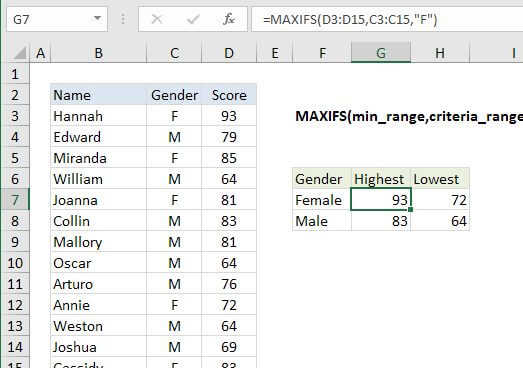
Summary
The Excel MAXIFS function returns the largest numeric value that meets one or more criteria in a range of values. MAXIFS can be used with criteria based on dates, numbers, text, and other conditions. MAXIFS supports logical operators (>,<><>,=) and wildcards (*,?) for partial matching.
Purpose
Get maximum value with criteria
Return value
Maximum value
Syntax
=MAXIFS (max_range, range1, criteria1, [range2], [criteria2], ...)
Arguments
- max_range - Range of values used to determine maximum.
- range1 - The first range to evaluate.
- criteria1 - The criteria to use on range1.
- range2 - [optional] The second range to evaluate.
- criteria2 - [optional] The criteria to use on range2.
Usage notes
In the example shown, the formula in G7 is:
=MAXIFS(D3:D15,C3:C15,"F")
- Criteria range(s) must be the same size and shape as the max_range.
- The MAXIFS function was introduced in Excel 2016.
- In earlier versions of Excel you can use an array formula based on MAX and IF to find minimum values with criteria.