Excel DAYS Function
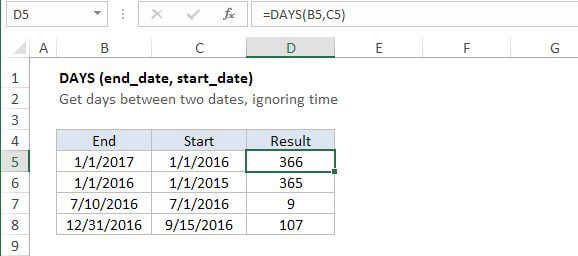
Summary
The Excel DAYS function returns the number of days between two dates. With a start date in A1 and end date in B1, =DAYS(B1,A1) will return the days between the two dates.
Purpose
Get days between dates
Return value
A number representing days.
Syntax
=DAYS (end_date, start_date)
Arguments
- end_date - The end date.
- start_date - The start date.
Usage notes
The DAYS function returns the number of days between two dates. With a start date in A1 and end date in A2,
=DAYS(A2,A1)
Will return the same result as:
=A2-A1
Unlike the simple formula above, the DAYS function can also handle dates in text format, as long as the date is recognized by Excel. For example:
=DAYS("7/15/2016","7/1/2016") // returns 14
The DAYS function does not take into account any time value that's part of the date.