Excel MODE Function
Summary
The Excel MODE function returns the most frequently occurring number in a numeric data set. For example, =MODE(1,2,4,4,5,5,5,6) returns 5.
Purpose
Get most frequently occurring number
Return value
A number representing the mode.
Syntax
=MODE (number1, [number2], ...)
Arguments
- number1 - A number or cell reference that refers to numeric values.
- number2 - [optional] A number or cell reference that refers to numeric values.
Usage notes
The Excel MODE function returns the most frequently occurring number in a numeric data set. Numbers can be supplied as numbers, ranges, named ranges, or cell references that contain numeric values. Up to 255 numbers can be supplied as separate arguments.
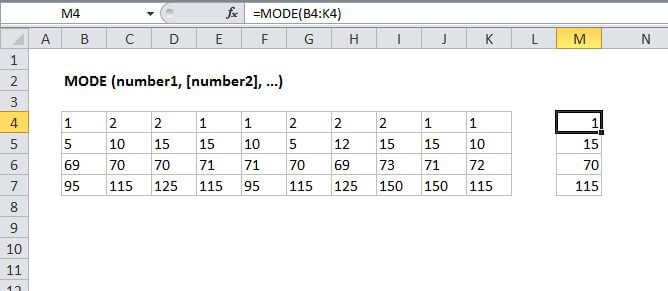
In the example shown, the formula in M4 is:
=MODE(B4:K4)
Note: The MODE function is now classified as a "compatibility function". Microsoft recommends that MODE.SNGL or MODE.MULT be used instead.
Notes
- If supplied numbers does not contain any duplicates, MODE will return #N/A
- The MODE function ignores empty cells, and cells that contain boolean values or text.
- Arguments can be numbers, names, arrays, or references.