Excel PERCENTRANK Function
Summary
The Excel PERCENTRANK function returns the rank of a value in a data set as a percentage of the data set. You can use PERCENTRANK to find the relative standing of a value within a data set. Percentile rank is commonly used as a way to interpret standing in standardized tests.
Purpose
Get percentile rank, inclusive
Return value
Calculated rank as a decimal value
Syntax
=PERCENTRANK (array, x, [significance])
Arguments
- array - Array of data values.
- x - Value to rank.
- significance - [optional] Number of significant digits in result. Defaults to 3.
Usage notes
The Excel PERCENTRANK shows the relative standing of a value within a data set as a percentage.
For example, a test score greater than 80% of all test scores is said to be at the 80th percentile. In this case PERCENTRANK will assign a rank of .80 to the score.
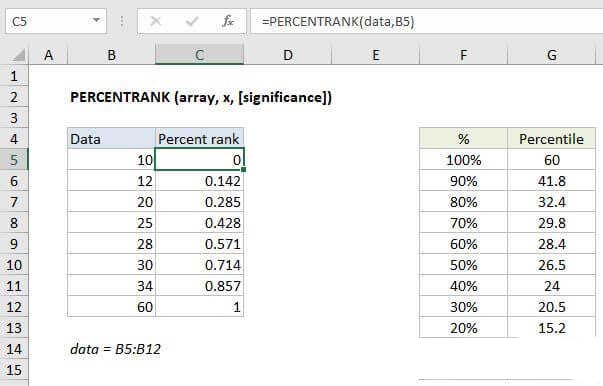
In the example shown, the formula in C5 is:
=PERCENTRANK(data,B5)
where "data" is the named range C5:C12.
Note: Microsoft classifies PERCENTRANK as a "compatibility function", now replaced by the PERCENTRANK.INC function.
Inclusive vs. Exclusive
Starting with Excel 2010, the PERCENTRANK function has been replaced by two functions: PERECENTRANK.INC and PERECENTRANK.INC. The INC version represents "inclusive" behavior, and the EXC version represents "exclusive" behavior. Both formulas use the same arguments.
- Use the PERCENTRANK.EXC function to determine the percentage rank exclusive of the first and last values in the array.
- Use the PERCENTRANK.INC or PERCENTRANK to find the percentage rank inclusive of the first and last values in the array.
Notes
- If x does not exist in the array, PERCENTRANK interpolates to find the percentage rank.
- When significance is omitted PERCENTRANK returns three significant digits (0.xxx)