Excel EDATE Function
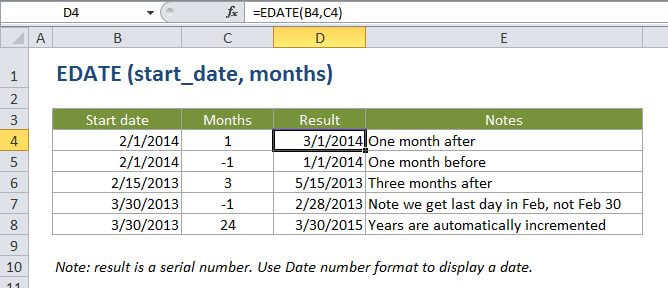
Summary
The Excel EDATE function returns a date on the same day of the month, x months in the past or future. You can use EDATE to calculate expiration dates, maturity dates, and other due dates. Use a positive value for months to get a date in the future, and a negative value for dates in the past.
Purpose
Get the same date in future or past months
Return value
A serial number that represents a particular date in Excel.
Syntax
=EDATE (start_date, months)
Arguments
- start_date - A date that represents the start date in a valid Excel serial number format.
- months - The number of months before or after start_date.
Usage notes
Use EDATE to get the same date in future or past months. For months, use a positive value for future dates and a negative value for dates in the past.
EDATE is clever about rolling "end of month" dates forwards or backwards. For example, =EDATE("1/31/2015",1) returns the date "2/28/2015" and =EDATE("1/31/2016",1) returns "2/29/2016", since 2016 is a leap year.