Excel DAVERAGE Function
Summary
The Excel DAVERAGE function returns the average in a given field for records that match criteria.
Purpose
Get average from matching records
Return value
The average value in a given field
Syntax
=DAVERAGE (database, field, criteria)
Arguments
- database - Database range including headers.
- field - Field name or index to count.
- criteria - Criteria range including headers.
Usage notes
The Excel DAVERAGE function gets the average in a given field for a subset of records that match criteria. The database argument is a range of cells that includes field headers, field is the name or index of the field to get a max value from, and criteria is a range of cells with headers that match those in database.
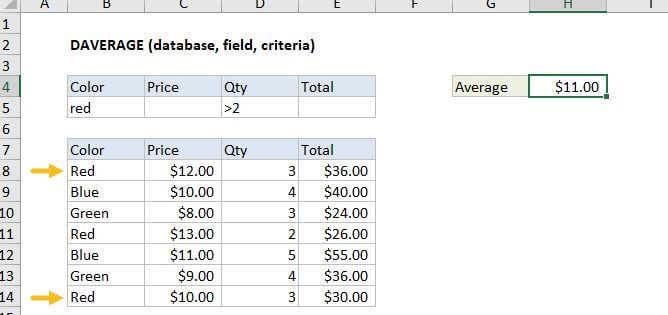
Using the example above, you can get the average value from the field "Price" for records where the color is "red" and quantity is > 2 with these formulas:
=DAVERAGE(B7:E14,"Price",B4:E5) // field by name=DAVERAGE(B7:E14,2,B4:E5) // field by index
Criteria options
The criteria can include a variety of expressions, including some wildcards. The table below shows some examples:
| Criteria | Behavior |
|---|---|
| Red | Match "red" or "RED" |
| Re* | Begins with "re" |
| 10 | Equal to 10 |
| >10 | Greater than 10 |
| <> | Not blank |
| <>100 | Not 100 |
| >12/19/2017 | Greater than Dec 19, 2017 |
Note: support for wildcards is a little different wildcards with COUNTIFS, SUMIFS, MATCH etc. For example, the pattern ??? will match strings with 3 exactly characters in these more recent functions, but not in database functions. If you are using wildcards, test carefully.
Multi-row criteria
The criteria range for DAVERAGE can include more than one row below the headers. When criteria includes more than one row, each row is joined with OR logic, and the expressions in a given criteria row are joined with AND logic.
Notes:
- DAVERAGE supports wildcards in criteria
- Criteria can include more than one row (as explained above)
- The field argument can be supplied as a name in double quotes ("") or as a number representing field index.
- The database and criteria ranges must include matching headers.