Excel EOMONTH Function
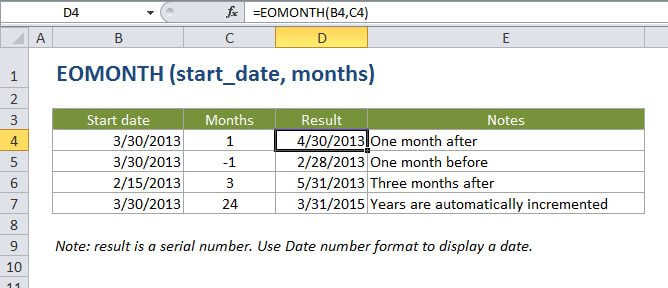
Summary
The Excel EOMONTH function returns the last day of the month, x months in the past or future. You can use EDATE to calculate expiration dates, due dates, and other dates that need to land on the last day of a month. Use a positive value for months to get a date in the future, and a negative value to get a date in the past.
Purpose
Get the last day of the month in future or past months
Return value
A serial number that represents a particular date in Excel.
Syntax
=EOMONTH (start_date, months)
Arguments
- start_date - A date that represents the start date in a valid Excel serial number format.
- months - The number of months before or after start_date.
Usage notes
EOMONTH takes two arguments: a start date, and months. Months represents the number of months to move in the future or past. For example, with May 12, 2017 in cell B5:
=EOMONTH(B5,0) returns May 31, 2017=EOMONTH(B5,4) returns Sep 30, 2017=EOMONTH(B5,-3) returns Feb 28, 2017
You can use EOMONTH to move through years as well:
=EOMONTH(B5,12) returns May 31, 2018=EOMONTH(B5,36) returns May 31, 2020=EOMONTH(B5,-24) returns May 31, 2015
Notes
- For months, use a positive value for future dates and a negative value for dates in the past.
- The EOMNTH function can be used to create many useful date formulas (see links on this page for details).