Excel VARP Function
Summary
The Excel VARP function calculates the variance of an entire population of data. If data represents a sample, use the VAR function or the newer VAR.S function. VARP ignores text values and logicals in references.
Purpose
Get variation of a population
Return value
Computed variance
Syntax
=VARP (number1, [number2], ...)
Arguments
- number1 - First number or reference.
- number2 - [optional] Second number or reference.
Usage notes
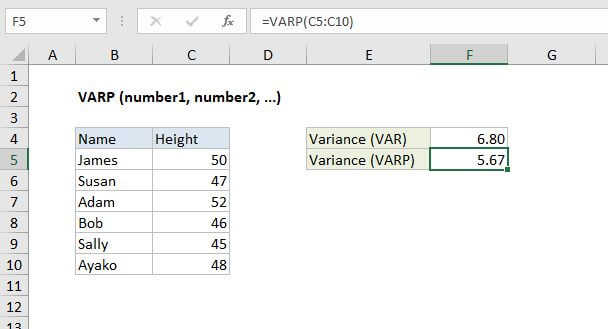
The VARP function calculates the variance of an entire population of data. Variance provides a general idea of the spread of data. In the example shown, the formula in F5 is:
=VARP(C5:C10)
VARP ignores text and logicals passed into as cell references. For example, VARP will ignore FALSE when it appears in a range like A1:A10. However, VARP will evaluate logical values, and text representations of numbers hardcoded directly as arguments.
Note: Microsoft classifies VARP as a "compatibility function", now replaced by the VAR.P function.
Variation functions in Excel
The table below summarizes the variation functions available in Excel.
| Name | Data set | Text and logicals |
|---|---|---|
| VAR | Sample | Ignored |
| VARP | Population | Ignored |
| VAR.S | Sample | Ignored |
| VAR.P | Population | Ignored |
| VARA | Sample | Evaluated |
| VARPA | Population | Evaluated |
Notes
- VARP assumes data is an entire population. If data represents a sample, use VAR or VAR.S
- VARP only evaluates numbers in references, ignoring empty cells, text, and logical values like TRUE or FALSE.
- Arguments can either be numbers or names, arrays, or references that contain numbers.
- Arguments can be hard-coded values instead of references.
- To evaluate logical values and/or text in references, use the VARA function.