Excel VARPA Function
Summary
The Excel VARPA function computes the variance of for a population of data. Unlike the VARP function, the VARPA function evaluates text values and logicals in references.
Purpose
Get variation of a population
Return value
Computed variance
Syntax
=VARPA (number1, [number2], ...)
Arguments
- number1 - First number or reference.
- number2 - [optional] Second number or reference.
Usage notes
The VARPA function calculates the variance for data that represents an entire population. Variance provides a general idea of the spread of data. Like the VARA function, the VARA function evaluates text values and logicals in references. Text is evaluated as zero, TRUE is evaluated as 1, and FALSE is evaluated as zero.
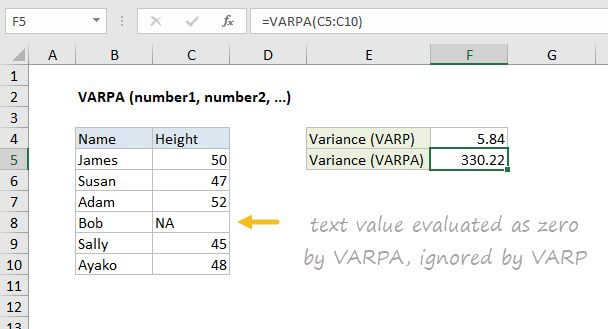
In the example shown, the formula in F5 is:
=VARPA(C5:C10)
Note that the VARP function ignores the "NA" text in C8, while VARPA includes this in the variance estimate as zero.
Like VARP, VARPA also evaluates logical values, and text representations of numbers when they are hardcoded directly into the function as arguments.
Variation functions in Excel
The table below summarizes the variation functions available in Excel.
| Name | Data set | Text and logicals |
|---|---|---|
| VAR | Sample | Ignored |
| VARP | Population | Ignored |
| VAR.S | Sample | Ignored |
| VAR.P | Population | Ignored |
| VARA | Sample | Evaluated |
| VARPA | Population | Evaluated |
Notes
- VARPA assumes data represents the entire population. If data represents a sample, use VARA or VAR.S
- VARPA evaluates text values and logicals in references, unlike VARP.
- Arguments can either be numbers or names, arrays, or references that contain numbers.
- Arguments can be hard-coded values instead of references.
- To ignore logical values and/or text in references, use VARP or VAR.P