Excel HOUR Function
Summary
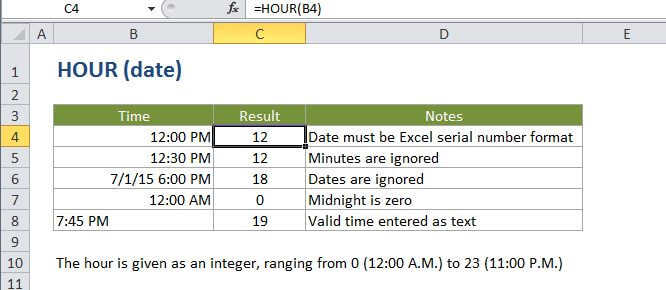
The Excel HOUR function returns the hour component of a time as a number between 0-23. For example, with a time of 9:30 AM, HOUR will return 9. You can use the HOUR function to extract the hour into a cell, or feed the result into another formula, like the TIME function.
Purpose
Get the hour as a number (0-23) from a Time
Return value
A number between 0 and 23.
Syntax
=HOUR (serial_number)
Arguments
- serial_number - A valid time in a format Excel recognizes.
Usage notes
Times can be supplied as text (e.g. "7:45 PM") or as decimal numbers (e.g. 0.5, which equals 12:00 PM).
Excel stores dates and times as serial numbers. For example, the date Jan 1, 2000 12:00 PM is equal to the serial number 32526.5 in Excel. To check that Excel is correctly recognizing a date or time, you can temporarily format the date as a number.