Excel LEN Function

Summary
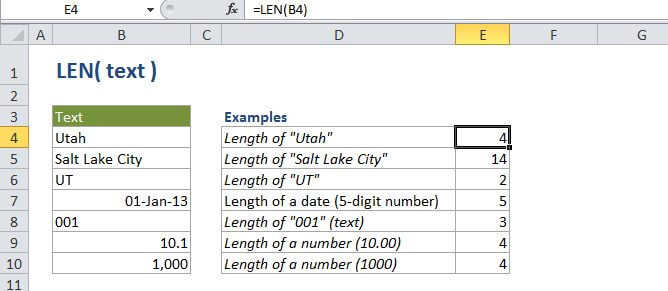
The Excel LEN function returns the length of a given text string as the number of characters. LEN will also count characters in numbers, but number formatting is not included.
Purpose
Get the length of text.
Return value
A number representing the lengh of the text.
Syntax
=LEN (text)
Arguments
- text - The text for which to calculate length.
Usage notes
- LEN is a useful when you want to count how many characters there are in some text.
- Numbers and dates will also return a length.
- Number formatting is not included. (i.e. the length of "100" formatted as "$100.00" is still 3).
Excel LEN Function

Summary
The Excel LEN function returns the length of a given text string as the number of characters. LEN will also count characters in numbers, but number formatting is not included.
Purpose
Get the length of text.
Return value
A number representing the lengh of the text.
Syntax
=LEN (text)
Arguments
- text - The text for which to calculate length.
Usage notes
- LEN is a useful when you want to count how many characters there are in some text.
- Numbers and dates will also return a length.
- Number formatting is not included. (i.e. the length of "100" formatted as "$100.00" is still 3).