Excel RIGHT Function
Summary
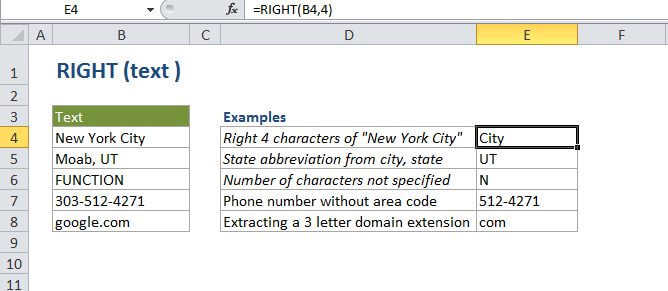
The Excel RIGHT function extracts a given number of characters from the right side of a supplied text string. For example, RIGHT("apple",3) returns "ple".
Purpose
Extract text from the right of a string
Return value
One or more characters.
Syntax
=RIGHT (text, [num_chars])
Arguments
- text - The text from which to extract characters on the right.
- num_chars - [optional] The number of characters to extract, starting on the right. Optional, default = 1.
Usage notes
- Use the RIGHT function when you want to extract characters starting at the right side of text.
- num_chars is optional and defaults to 1.
- RIGHT will extract digits from numbers as well.
- Number formatting is not part of a and will not be extracted or counted.
Excel RIGHT Function

Summary
The Excel RIGHT function extracts a given number of characters from the right side of a supplied text string. For example, RIGHT("apple",3) returns "ple".
Purpose
Extract text from the right of a string
Return value
One or more characters.
Syntax
=RIGHT (text, [num_chars])
Arguments
- text - The text from which to extract characters on the right.
- num_chars - [optional] The number of characters to extract, starting on the right. Optional, default = 1.
Usage notes
- Use the RIGHT function when you want to extract characters starting at the right side of text.
- num_chars is optional and defaults to 1.
- RIGHT will extract digits from numbers as well.
- Number formatting is not part of a and will not be extracted or counted.