Excel SEARCH Function
Summary
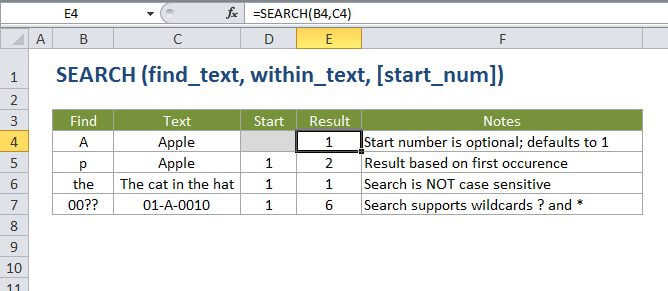
The Excel SEARCH function returns the location of one text string inside another. SEARCH returns the position of the first character of find_text inside within_text. Unlike FIND, SEARCH allows wildcards, and is not case-sensitive.
Purpose
Get the location of text in a string
Return value
A number representing the location of find_text.
Syntax
=SEARCH (find_text, within_text, [start_num])
Arguments
- find_text - The text to find.
- within_text - The text to search within.
- start_num - [optional] Starting position in the text to search. Optional, defaults to 1.
Usage notes
Use the SEARCH function to get the location of one text string inside another.
- SEARCH returns the position of the first character of find_text inside within_text.
- Unlike FIND, SEARCH allows the use of wildcards, and is not case-sensitive.
- SEARCH allows the wildcard characters question mark (?) and asterisk (*), in find_text.
- The ? matches any single character and the * matches any sequence of characters.
- To find a literal ? or *, use a tilde (~) before the character, i.e. ~* and ~?.
Excel SEARCH Function

Summary
The Excel SEARCH function returns the location of one text string inside another. SEARCH returns the position of the first character of find_text inside within_text. Unlike FIND, SEARCH allows wildcards, and is not case-sensitive.
Purpose
Get the location of text in a string
Return value
A number representing the location of find_text.
Syntax
=SEARCH (find_text, within_text, [start_num])
Arguments
- find_text - The text to find.
- within_text - The text to search within.
- start_num - [optional] Starting position in the text to search. Optional, defaults to 1.
Usage notes
Use the SEARCH function to get the location of one text string inside another.
- SEARCH returns the position of the first character of find_text inside within_text.
- Unlike FIND, SEARCH allows the use of wildcards, and is not case-sensitive.
- SEARCH allows the wildcard characters question mark (?) and asterisk (*), in find_text.
- The ? matches any single character and the * matches any sequence of characters.
- To find a literal ? or *, use a tilde (~) before the character, i.e. ~* and ~?.