Excel SUBSTITUTE Function
Summary
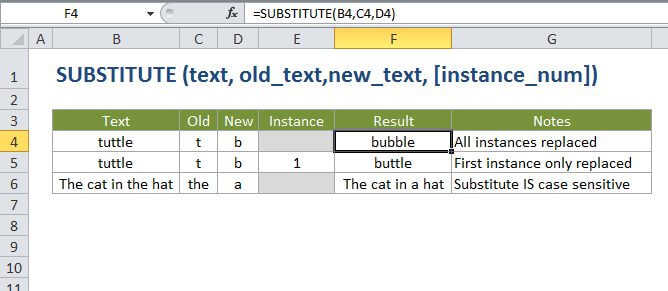
The Excel SUBSTITUTE function replaces text in a given string by matching. For example =SUBSTITUTE("952-455-7865","-","") returns "9524557865"; the dash is stripped. SUBSTITUTE is case-sensitive and does not support wildcards.
Purpose
Replace text based on content
Return value
The altered text.
Syntax
=SUBSTITUTE (text, old_text, new_text, [instance])
Arguments
- text - The text to change.
- old_text - The text to replace.
- new_text - The text to replace with.
- instance - [optional] The instance of old_text to replace with new_text. Optional; if not supplied, all instances of old_text are replaced with new_text.
Usage notes
Use the SUBSTITUTE function when you want to replace text based on its content, not position.
- SUBSTITUTE finds and replaces old_text with new_text in a text string. Instance limits SUBSTITUTE replacement to one particular instance of old_text. If instance is not supplied, all instances of old_text are replaced with new_text.
- instance is optional. if not supplied, all instances of old_text are replaced with new_text.
- Use SUBSTITUTE to replace text based on content. Use REPLACE when to replace text based on its location.
- SUBSTITUTE is case-sensitive and does not support wildcards.