Get fiscal quarter from date
Generic formula 

=CHOOSE(MONTH(date),1,1,1,2,2,2,3,3,3,4,4,4)

Related formulas 

Get quarter from date

Get fiscal year from date

Explanation

If you want to calculate the fiscal quarter from a date, and the fiscal quarter starts in a month other than January, you can use a formula based on the CHOOSE function.

Note: if you just need to calculate a "normal" quarter based on a quarter system that starts in January, you can use this simpler formula.

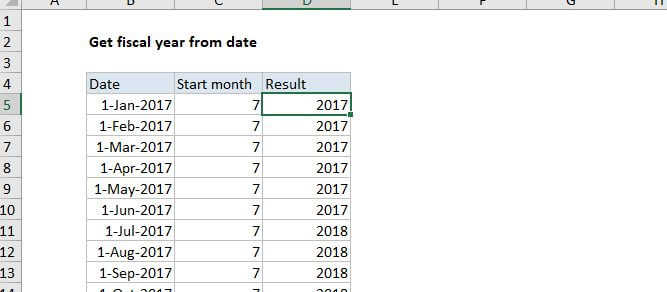
In the example shown, the formula in cell D5 is:

=CHOOSE(MONTH(B5),4,4,4,1,1,1,2,2,2,3,3,3)

This formula returns a number, 1-4 that corresponds to a quarter system that begins in April and ends in March.

How this formula works

The choose function uses the first argument to "select" remaining elements. For example, in a scheme where 1 = small, 2 = medium, and 3 = large, this formula will "map" the number 2 to "medium".

=CHOOSE(2,"small","medium","large")

In the case of fiscal quarters, we can use this same idea to map any incoming month (1-12) to one of 4 quarter values. We just need to use the MONTH function to get the month number as the first argument, then provide 12 numbers (one for each month of the year) that are carefully ordered to reflect the fiscal year desired:

=CHOOSE(MONTH(B5),1,1,1,2,2,2,3,3,3,4,4,4) // Jan start=CHOOSE(MONTH(B5),4,4,4,1,1,1,2,2,2,3,3,3) // Apr start=CHOOSE(MONTH(B5),3,3,3,4,4,4,1,1,1,2,2,2) // Jul start=CHOOSE(MONTH(B5),2,2,2,3,3,3,4,4,4,1,1,1) // Oct start

Adding a Q and year

If you want the quarter number to include a "Q" with a year value, you can concatenate:

="Q"&CHOOSE(MONTH(date),1,1,1,2,2,2,3,3,3,4,4,4)&" - "&YEAR(date)

Will return values like: "Q1 - 2016", "Q2 - 2016", etc.

Get fiscal quarter from date

Generic formula 

=CHOOSE(MONTH(date),1,1,1,2,2,2,3,3,3,4,4,4)

Related formulas 

Get quarter from date

Get fiscal year from date

Explanation

If you want to calculate the fiscal quarter from a date, and the fiscal quarter starts in a month other than January, you can use a formula based on the CHOOSE function.

Note: if you just need to calculate a "normal" quarter based on a quarter system that starts in January, you can use this simpler formula.

In the example shown, the formula in cell D5 is:

=CHOOSE(MONTH(B5),4,4,4,1,1,1,2,2,2,3,3,3)

This formula returns a number, 1-4 that corresponds to a quarter system that begins in April and ends in March.

How this formula works

The choose function uses the first argument to "select" remaining elements. For example, in a scheme where 1 = small, 2 = medium, and 3 = large, this formula will "map" the number 2 to "medium".

=CHOOSE(2,"small","medium","large")

In the case of fiscal quarters, we can use this same idea to map any incoming month (1-12) to one of 4 quarter values. We just need to use the MONTH function to get the month number as the first argument, then provide 12 numbers (one for each month of the year) that are carefully ordered to reflect the fiscal year desired:

=CHOOSE(MONTH(B5),1,1,1,2,2,2,3,3,3,4,4,4) // Jan start=CHOOSE(MONTH(B5),4,4,4,1,1,1,2,2,2,3,3,3) // Apr start=CHOOSE(MONTH(B5),3,3,3,4,4,4,1,1,1,2,2,2) // Jul start=CHOOSE(MONTH(B5),2,2,2,3,3,3,4,4,4,1,1,1) // Oct start

Adding a Q and year

If you want the quarter number to include a "Q" with a year value, you can concatenate:

="Q"&CHOOSE(MONTH(date),1,1,1,2,2,2,3,3,3,4,4,4)&" - "&YEAR(date)

Will return values like: "Q1 - 2016", "Q2 - 2016", etc.