Get pivot table grand total
Generic formula 

=GETPIVOTDATA("field name",pivot_ref)

Related formulas 

Get pivot table subtotal

Get pivot table subtotal grouped date

Explanation

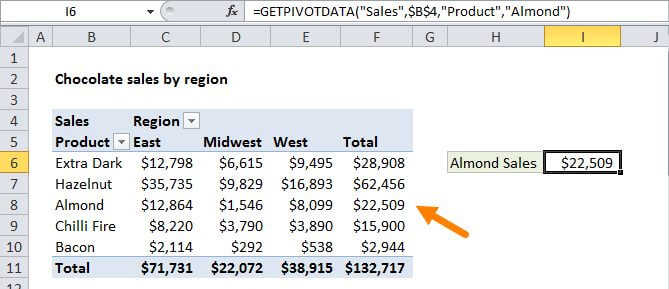
To get the grand total for a value field in a pivot table, you can use the GETPIVOTDATA function. In the example shown, the formula in I6 is:

=GETPIVOTDATA("Sales",$B$4)

Although you can reference any cell in a pivot table with a normal reference (i.e. F11) the GETPIVOTDATA will continue to return correct values even when the pivot table changes.

How this formula works

To use the GETPIVOTDATA function, the field you want to query must be a value field in the pivot table, subtotaled at the right level.

In this case, we want the grand total of the "sales" field, so we simply provide the name the field in the first argument, and supply a reference to the pivot table in the second:

=GETPIVOTDATA("Sales",$B$4)

The pivot_table reference can be any cell in the pivot table, but by convention we use the upper left cell.

Note: GETPIVOTDATA will return the value field based on current "summarize by" settings (sum, count, average, etc.).

Get pivot table grand total

Generic formula 

=GETPIVOTDATA("field name",pivot_ref)

Related formulas 

Get pivot table subtotal

Get pivot table subtotal grouped date

Explanation

To get the grand total for a value field in a pivot table, you can use the GETPIVOTDATA function. In the example shown, the formula in I6 is:

=GETPIVOTDATA("Sales",$B$4)

Although you can reference any cell in a pivot table with a normal reference (i.e. F11) the GETPIVOTDATA will continue to return correct values even when the pivot table changes.

How this formula works

To use the GETPIVOTDATA function, the field you want to query must be a value field in the pivot table, subtotaled at the right level.

In this case, we want the grand total of the "sales" field, so we simply provide the name the field in the first argument, and supply a reference to the pivot table in the second:

=GETPIVOTDATA("Sales",$B$4)

The pivot_table reference can be any cell in the pivot table, but by convention we use the upper left cell.

Note: GETPIVOTDATA will return the value field based on current "summarize by" settings (sum, count, average, etc.).