Excel IRR Function
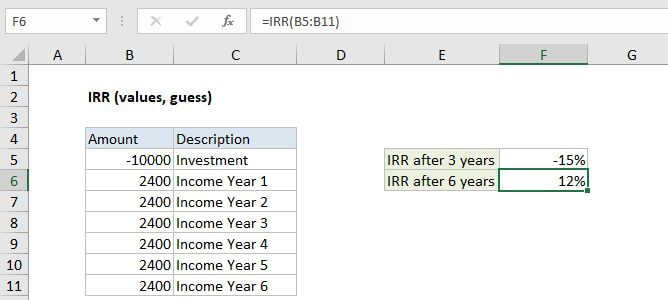
Summary
The Excel IRR function is a financial function that returns the internal rate of return (IRR) for a series of cash flows that occur at regular intervals.
Purpose
Calculate internal rate of return
Return value
Calculated return as percentage
Syntax
=IRR (values, [guess])
Arguments
- values - Array or reference to cells that contain values.
- guess - [optional] An estimate for expected IRR. Default is .1 (10%).
Usage notes
The internal rate of return (IRR) is the interest rate received for an investment with payments and income occurring at regular intervals (i.e. monthly, annual). Payments are expressed as negative values and income as positive values. Amounts can vary, but intervals need to be the same. The first value is negative, since it represents an outflow.
Excel uses iteration to arrive at a result, starting with the guess (if provided) or with .1 (10%) if not. If an accurate IRR can't be calculated after a fixed number of iterations, the #NUM error is returned. A better guess will prevent this error.
Notes
- The values array must contain at least one positive value and one negative value.
- Values should be in chronological order.
- If IRR returns the #NUM! or an unexpected result, adjust guess.