Excel XIRR Function
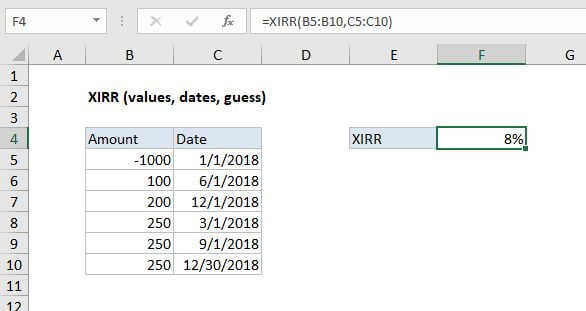
Summary
The Excel XIRR function is a financial function that returns the internal rate of return (IRR) for a series of cash flows that occur at irregular intervals.
Purpose
Calculate internal rate of return for irregular cash flows
Return value
Calculated return as percentage
Syntax
=XIRR (values, dates, [guess])
Arguments
- values - Array or reference to cells that contain cash flows.
- dates - Dates that correspond to cash flows.
- guess - [optional] An estimate for expected IRR. Default is .1 (10%).
Usage notes
The XIRR function calculates in the internal rate of return for series of cash flows that occur at irregular intervals. To calculate the internal rate of return for a series of regular, periodic cash flows, use the IRR function.
Payments are expressed as negative values and income as positive values. If the first value is a cost or payment, it must be a negative value. Subsequent payments are discounted based on a 365-day year.
Dates must be valid Excel dates in chronological order. You can use the DATE function to enter dates precisely if needed.
Excel uses iteration to arrive at a result, starting with the guess (if provided) or with .1 (10%) if not. If an accurate rate can't be calculated after a fixed number of iterations, the #NUM error is returned.
Notes
- The values array must contain at least one positive value and one negative value.
- Dates must be valid Excel dates that correspond to values
- Values and dates should be in chronological order.