Excel XNPV Function
Summary
The Excel XNPV function is a financial function that calculates the net present value (NPV) of an investment using a discount rate and a series of cash flows that occur at irregular intervals.
Purpose
Calculate net present value for irregular cash flows
Return value
Net present value
Syntax
=XNPV (rate, values, dates)
Arguments
- rate - Discount rate to apply to the cash flows.
- values - Values representing cash flows.
- dates - Dates that correspond to cash flows.
Usage notes
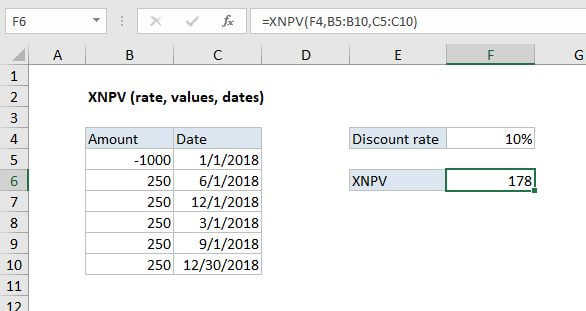
The Excel XNPV function calculates the net present value (NPV) of an investment based on a discount rate and a series of cash flows that occur at irregular intervals. Cash flows need to be listed with dates in chronological order. Negative values represent cash paid out; positive values represent cash received.In the example shown, the formula in F6 is:
=XNPV(F4,B5:B10,C5:C10)
XNPV doesn’t discount the initial cash flow. Subsequent payments are discounted based on a 365-day year. To discount to a particular valuation date, you can set up XNPV so that the first cashflow is zero, associated with the valuation date.
Notes:
- Rate is provided as a percentage (.12 for 12%)
- Dates and values must be in chronological order.
- Dates must be valid Excel dates
- XNPV doesn’t discount the initial cash flow