Excel CELL Function
Summary
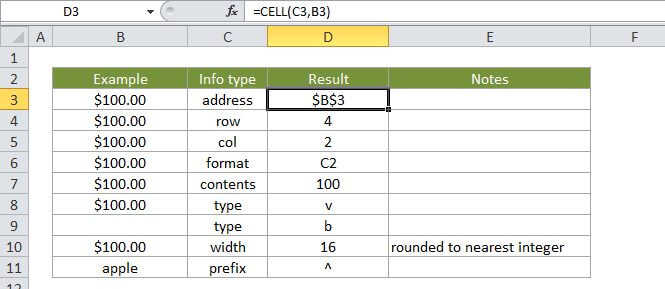
The Excel CELL function returns information about a cell in a worksheet. The type of information to be returned is specified as info_type. CELL can get things like address and filename, as well as detailed info about the formatting used in the cell. See below for a full list of information available.
Purpose
Get information about a cell
Return value
A text value
Syntax
=CELL (info_type, [reference])
Arguments
- info_type - The type of information to return about the reference.
- reference - [optional] The reference from which to extract information.
Usage notes
Use CELL to extract a wide range of information about reference. The type of information to be returned is specified as info_type. Always wrap the info_type in double quotes. For the formula: =CELL("col", C10) will return 3. See below for a full list of info_types and a key to the codes that CELL returns when the info_type is format.
Note that when reference refers to more than one cell, CELL will return information about the first cell in reference.
The following info_types can be used with the CELL function:
| Info_type | Description |
|---|---|
| address | returns the address of the first cell in reference (as text). |
| col | returns the column number of the first cell in reference. |
| color | returns the value 1 if the first cell in reference is formatted using color for negative values; or zero if not. |
| contents | returns the value of the upper-left cell in reference. Formulas are not returned. Instead, the result of the formula is returned. |
| filename | returns the file name and full path as text. If the worksheet that contains reference has not yet been saved, an empty string is returned. |
| format | returns a code that corresponds to the number format of the cell. See below for a list of number format codes. If the first cell in reference is formatted with color for values <> |
| parentheses | returns 1 the first cell in reference is formatted with parentheses and 0 if not. |
| prefix | returns a text value that corresponds to the label prefix - of the cell: a single quotation mark (') if the cell text os left-aligned, a double quotation mark (") if the cell text is right-aligned, a caret (^) if the cell text is centered text, a backslash () if the cell text is fill-aligned, and an empty string if the label prefix is anything else. |
| protect | returns 1 if the first cell in reference is locked or 0 if not. |
| row | returns the row number of the first cell in reference. |
| type | returns a text value that corresponds to the type of data in the first cell in reference: "b" for blank when the cell is empty, "l" for label if the cell contains a text constant, and "v" for value if the cell contains anything else. |
| width | returns the column width of the cell, rounded to the nearest integer. A unit of column width is equal to the width of one character in the default font size. |
The following table is a key for the text codes that are returned from CELL when "format" is used for info_type.
| Format code returned | Format code meaning |
|---|---|
| G | General |
| F0 | 0 |
| ,0 | #,##0 |
| F2 | 0 |
| ,2 | #,##0.00 |
| C0 | $#,##0_);($#,##0) |
| C0- | $#,##0_);[Red]($#,##0) |
| C2 | $#,##0.00_);($#,##0.00) |
| C2- | $#,##0.00_);[Red]($#,##0.00) |
| P0 | 0% |
| P2 | 0.00% |
| S2 | 0.00E+00 |
| G | # ?/? or # ??/?? |
| D1 | d-mmm-yy or dd-mmm-yy |
| D2 | d-mmm or dd-mmm |
| D3 | mmm-yy |
| D4 | m/d/yy or m/d/yy h:mm or mm/dd/yy |
| D5 | mm/dd |
| D6 | h:mm:ss AM/PM |
| D7 | h:mm AM/PM |
| D8 | h:mm:ss |