Sum if cells are equal to
Related formulas 

Sum if cells are not equal to

Sum if equal to either x or y

Sum if not blank

Sum if begins with

Sum if cells contain specific text

Explanation

If you need to sum numbers based on other cells being equal to a certain value, you can easily do with either the SUMIF or SUMIFS function.

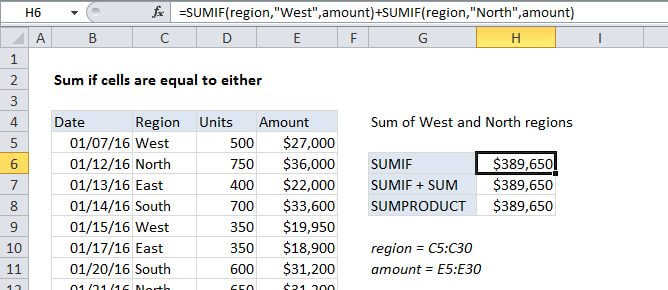
In the example shown, we are summing all sales in the West region. The formula in cell H6 is:

=SUMIF(region,"West",amount)

The formula in cell H7 is:

=SUMIFS(amount,region,"West")

Both formulas refer to the named ranges region (C5:C30) and amount (E5:E30).

How these formulas work

Both formulas use built-in functions to calculate a subtotal, but the syntax used by SUMIF and SUMIFS is slightly different:

SUMIF(range,criteria,sum_range)SUMIFS(sum_range,range,criteria)

In both cases, note that the region "West" must be enclosed in double quotes, since it is a text value.

Whether you use SUMIF or SUMIFS (which can handle more than one criteria) is a matter of personal preference. SUMIFS was introduced with Excel 2007, so it's been around now for a long time.

Sum if cells are equal to

Related formulas 

Sum if cells are not equal to

Sum if equal to either x or y

Sum if not blank

Sum if begins with

Sum if cells contain specific text

Explanation

If you need to sum numbers based on other cells being equal to a certain value, you can easily do with either the SUMIF or SUMIFS function.

In the example shown, we are summing all sales in the West region. The formula in cell H6 is:

=SUMIF(region,"West",amount)

The formula in cell H7 is:

=SUMIFS(amount,region,"West")

Both formulas refer to the named ranges region (C5:C30) and amount (E5:E30).

How these formulas work

Both formulas use built-in functions to calculate a subtotal, but the syntax used by SUMIF and SUMIFS is slightly different:

SUMIF(range,criteria,sum_range)SUMIFS(sum_range,range,criteria)

In both cases, note that the region "West" must be enclosed in double quotes, since it is a text value.

Whether you use SUMIF or SUMIFS (which can handle more than one criteria) is a matter of personal preference. SUMIFS was introduced with Excel 2007, so it's been around now for a long time.