Excel SHEETS Function
Summary
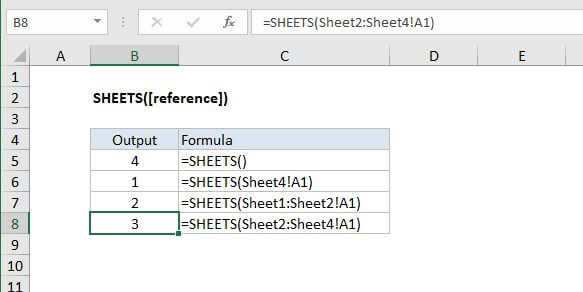
The Excel SHEETS function returns the total number of sheets in a given reference. When no arguments are supplied SHEETS returns the total number of sheets in the workbook.
Purpose
Get number of sheets in a reference
Return value
Sheet count
Syntax
=SHEETS ([reference])
Arguments
- reference - [optional] A valid Excel reference.
Usage notes
Use the SHEETS function to get the total number of sheets in a given reference. When no arguments are supplied, SHEETS returns the total number of sheets in the workbook. The SHEETS function includes hidden sheets.
For example, in a workbook that contains 3 sheets, the following formula will return 3:
=SHEETS()
Sheets can be used to report the sheet count in 3D references as well. For example, the following formula will return 2:
=SHEETS(Sheet1:Sheet2!A1)
Notes
- If the reference is omitted, SHEETS returns total sheet count in a workbook
- The SHEETS function includes hidden sheets in the count
- SHEETS will report sheet count in 3D references
- SHEET reports the index of a sheet, the SHEETS function reports the number of sheets in a reference