Sum if cells contain both x and y
Generic formula 

=SUMIFS(rng1,rng2,"*cat*",rng2,"*rat*")

Related formulas 

Sum if cells contain either x or y

Count cells that contain either x or y

Cell contains specific text

Count cells that contain specific text

Count cells equal to either x or y

Explanation

To sum if cells contain both x and y (i.e. contain "cat" and "rat", in the same cell) you can use the SUMIFS function.

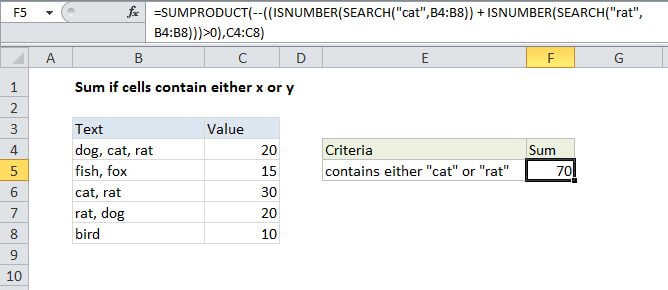
In the example shown, the formula in F5 is:

=SUMIFS(C4:C8,B4:B8,"*cat*",B4:B8,"*rat*")

How this formula works

The SUMIFS function is based on AND logic and this behavior is automatic. We just need to supply two range/criteria pairs, both operating on the same range (B4:B11).

For both criteria (contains "rat", contains "cat") we use an asterisk, which is a wildcard that matches "one or more characters". We put an asterisk at the start and end to allow the formula to match "cat" and "rat" wherever they appear in the cell.

When both criteria return TRUE in the same row, SUMIFS sums the value in column C.

Note that SUMIFs is not case-sensitive.

Sum if cells contain both x and y

Generic formula 

=SUMIFS(rng1,rng2,"*cat*",rng2,"*rat*")

Related formulas 

Sum if cells contain either x or y

Count cells that contain either x or y

Cell contains specific text

Count cells that contain specific text

Count cells equal to either x or y

Explanation

To sum if cells contain both x and y (i.e. contain "cat" and "rat", in the same cell) you can use the SUMIFS function.

In the example shown, the formula in F5 is:

=SUMIFS(C4:C8,B4:B8,"*cat*",B4:B8,"*rat*")

How this formula works

The SUMIFS function is based on AND logic and this behavior is automatic. We just need to supply two range/criteria pairs, both operating on the same range (B4:B11).

For both criteria (contains "rat", contains "cat") we use an asterisk, which is a wildcard that matches "one or more characters". We put an asterisk at the start and end to allow the formula to match "cat" and "rat" wherever they appear in the cell.

When both criteria return TRUE in the same row, SUMIFS sums the value in column C.

Note that SUMIFs is not case-sensitive.