Excel AND Function
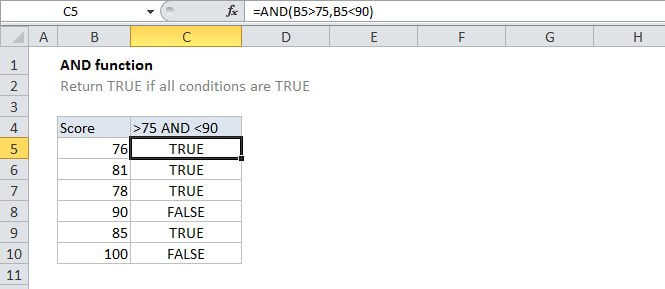
Summary
The AND function is a logical function used to require more than one condition at the same time. AND returns either TRUE or FALSE. To test if a number in A1 is greater than zero and less than 10, use =AND(A1>0,A1<10).></10).>
Purpose
Test multiple conditions with AND
Return value
TRUE if all arguments evaluate TRUE; FALSE if not
Syntax
=AND (logical1, [logical2], ...)
Arguments
- logical1 - The first condition or logical value to evaluate.
- logical2 - [optional] The second condition or logical value to evaluate.
Usage notes
Use the AND function to test multiple conditions at the same time, up to 255 conditions. Each logical condition (logical1, logical2, etc.) must evaluate to TRUE or FALSE, or be arrays or references that contain logical values.
For example, to test if the value in A1 is greater than 0 and less than 5, use the following formula:
=AND(A1>0,A1<5)
It can be useful to extend the functionality of functions like IF with AND. Using the above example, you can supply AND as the logical_test for the IF function like so:
=IF(AND(A1>0,A1<5), "Approved", "Denied")
This formula will return "Approved" only if the value in A1 is greater than 0 and less than 5.
Notes:
- Text values or empty cells supplied as arguments are ignored.
- The AND function will return #VALUE if no logical values are found or created during evaluation.